
Read Time: 7 minutes
TL;DR
I told OpenClaw to update itself. It did. Then the gateway refused to start because a config field had quietly changed shape between releases (channels.discord.streaming went from string to object). openclaw doctor --fix saw the problem but couldn’t fix it. The Google AI Overview confidently suggested the opposite of the correct fix. Hermes-Agent, with shell and filesystem access, read the failing config, made the right one-line change, backed up the original, restarted the service, and verified — all from a one-paragraph prompt. Thirteen minutes from red banner to green. This is what “agentic ops” actually looks like.
I have been running OpenClaw on a Raspberry Pi 5 for a while now. It is the kind of setup you tune on weekends and forget about during the week — until an update lands and something quietly breaks.
This morning was one of those mornings. What I want to write down is not just the bug, but the shape of the fix. OpenClaw’s own repair tool did not get the gateway back up. Neither did the AI Overview at the top of every Google result. What worked was a general-purpose agent with shell and file access, and the habit of reading a config before having an opinion about it.
That distinction sounds small. It is not.
Step 1: I Asked AgentX to Update Itself
The whole story starts with a perfectly reasonable instruction. I opened the OpenClaw chat UI, said hi to AgentX (my main OpenClaw agent), and asked it to update.
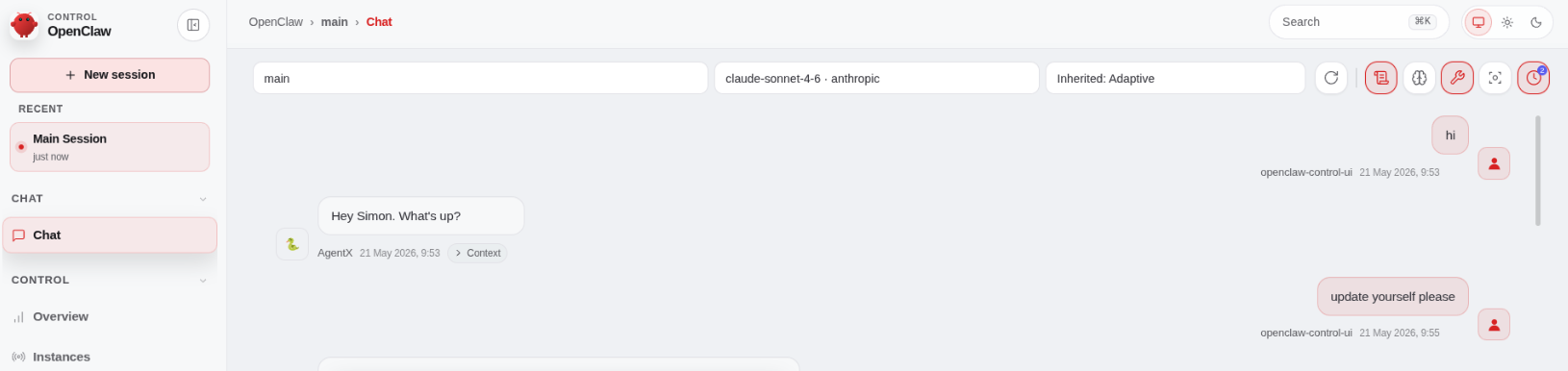
update yourself please. The kind of thing you say to an autonomous agent and assume it will handle.
It did handle the update part. It just did not handle the post-update validation part, because that is not yet a thing OpenClaw does by itself. The new release introduced a schema change to one of the config fields. The update wrote the new binaries. The config file kept its old shape. The next gateway start would fail.
I did not know any of this yet.
Step 2: Half an Hour Later, the Gateway Refuses to Start
Same session, same morning. The update completed quietly in the background. When I went to bring the gateway up — openclaw gateway, expecting a normal boot — I got this instead:
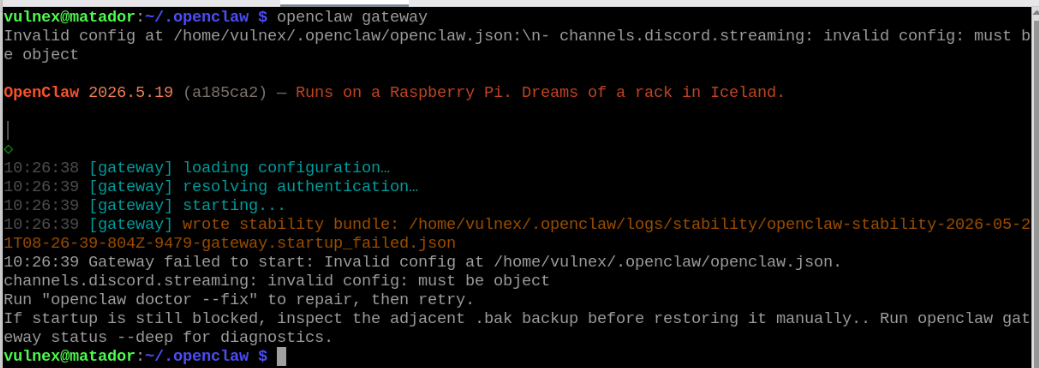
Invalid config at /home/vulnex/.openclaw/openclaw.json:
channels.discord.streaming: invalid config: must be object
Run "openclaw doctor --fix" to repair, then retry.
Helpful, in theory. The startup writes a stability bundle (good — that is what stability bundles are for) and the service dies on its way back down.
Step 3: Status Check Confirms the Broken State
I ran openclaw gateway status to get the full picture.
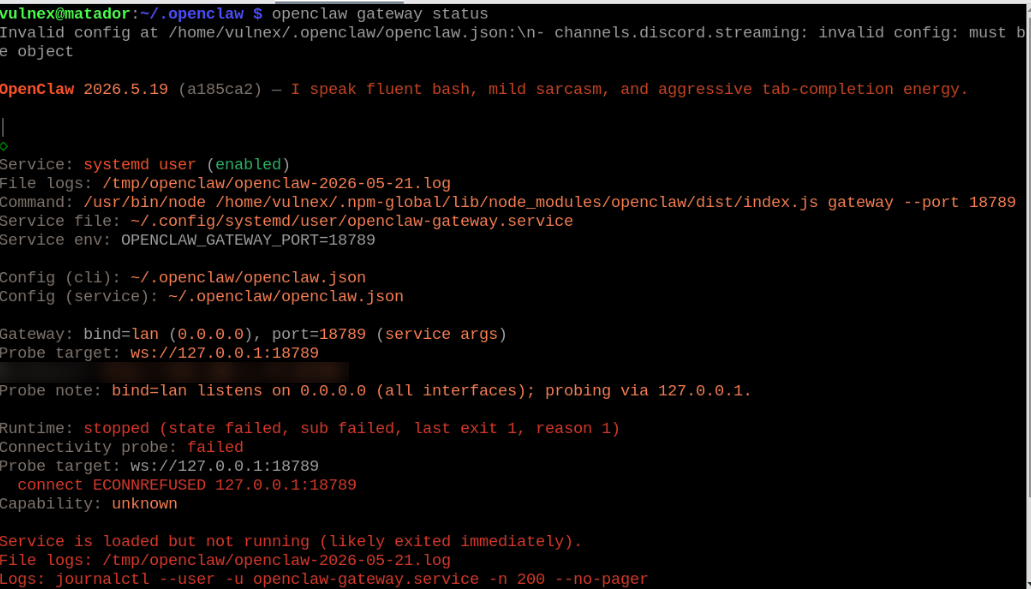
Red line across the board. state failed, sub failed, last exit 1, reason 1. The dashboard URL was sitting there mocking me, the loopback probe couldn’t connect, and the gateway was clearly not coming back without intervention.
This is the moment where, in a normal world, you would walk through OpenClaw’s suggested fix and be done in five minutes. So that is what I tried first.
Step 4: doctor --fix — The Self-Repair That Wasn’t (Part 1)
openclaw doctor --fix is meant to be the “have you tried turning it off and on again” button. So I tried it.
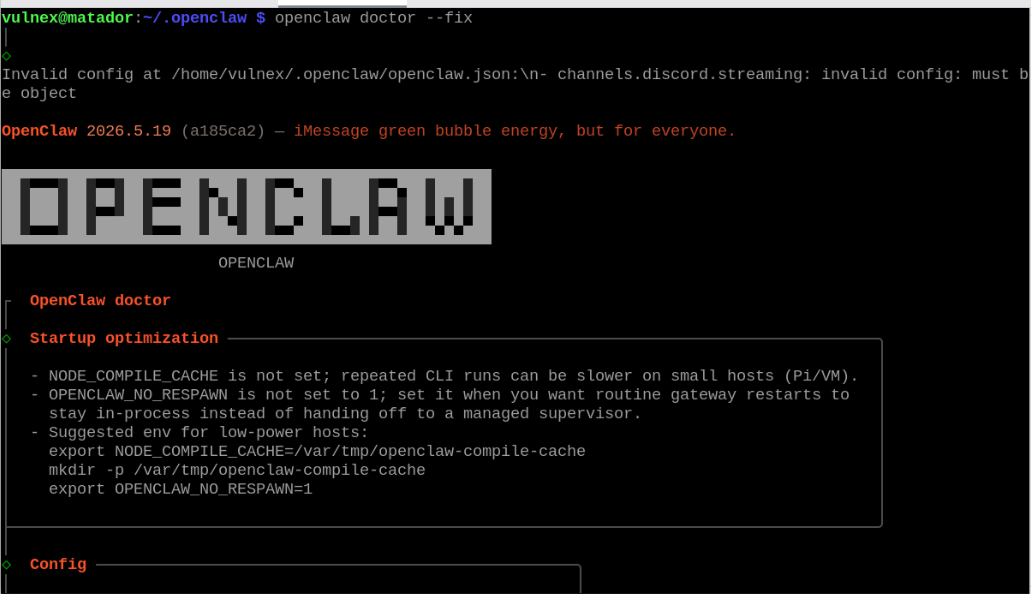
The doctor was happy to lecture me about NODE_COMPILE_CACHE and OPENCLAW_NO_RESPAWN on low-power hosts. Useful tips. Not the problem.
Step 5: doctor --fix — The Self-Repair That Wasn’t (Part 2)
The doctor walked through the config and gateway sections and ended where I started:
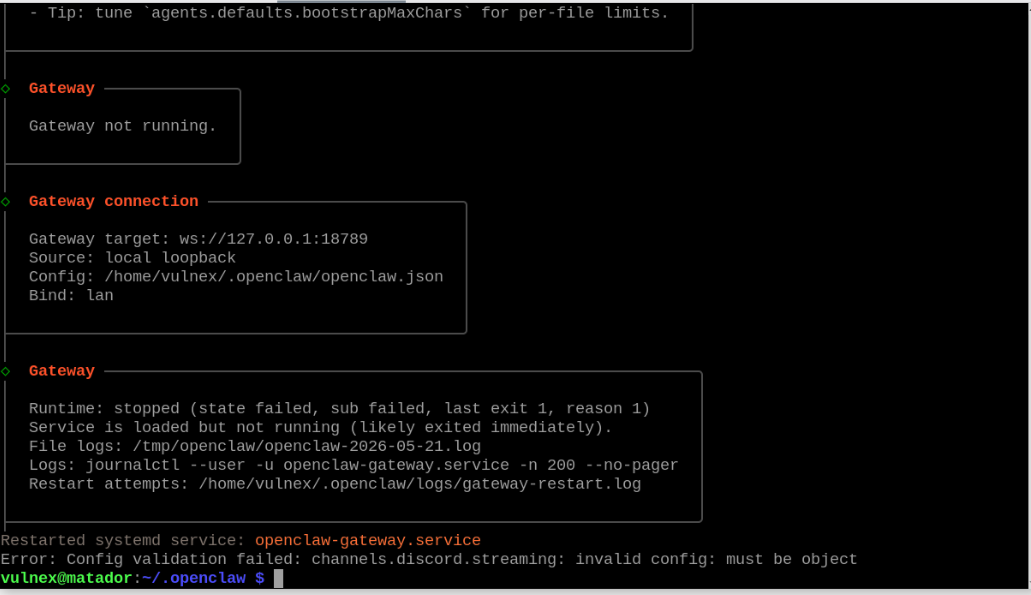
Restarted systemd service: openclaw-gateway.service
Error: Config validation failed: channels.discord.streaming: invalid config: must be object
The doctor restarted the service but never actually touched the offending key. Which makes sense, in hindsight. The validator says “must be object,” but the doctor has no opinion on what that object should look like. It is not in the business of guessing new schemas. Fair enough. Not very useful at 10:27 in the morning.
One thing OpenClaw should change: doctor --fix should not print “Restarted systemd service” one line above “Error: Config validation failed” and exit happy. It tripped me up, and it will trip other people up. I will file the bug.
Step 6: The Wrong Answer From the AI Overview
At this point I did what most people would do: I pasted the exact error string into Google to see if anyone else had hit this between versions.
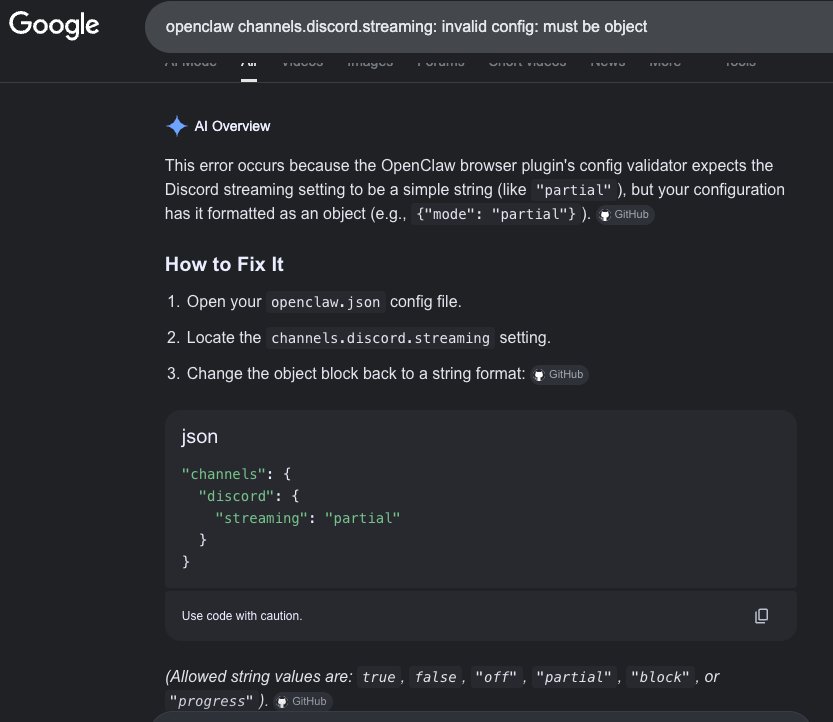
It told me the validator wants a string like "partial", and that my config has an object — when in reality the new OpenClaw expects an object and my old config has a string. It even produced a tidy, syntax-highlighted JSON block I could have copy-pasted straight into the config to break it harder, and tagged the answer with a confidence-inspiring GitHub citation pill.
If I had been in a hurry, I would have pasted it. That is the part most “AI for ops” demos quietly skip. The answer was fluent, well-formatted, even cited — and 180° wrong about the direction the schema had migrated.
It is the same threat model I covered in Professional Vibe Coding vs. Vibe Coding, just dropped into an ops context instead of a coding one. If your AI cannot read the validator and the config, you are going to get a confident answer that was synthesised from the error string, and sometimes that answer is the opposite of correct.
Step 7: Calling In Hermes
I keep Hermes-Agent attached to this box for exactly this kind of mess. It has filesystem tools, shell execution, and the patience to read things instead of guessing.
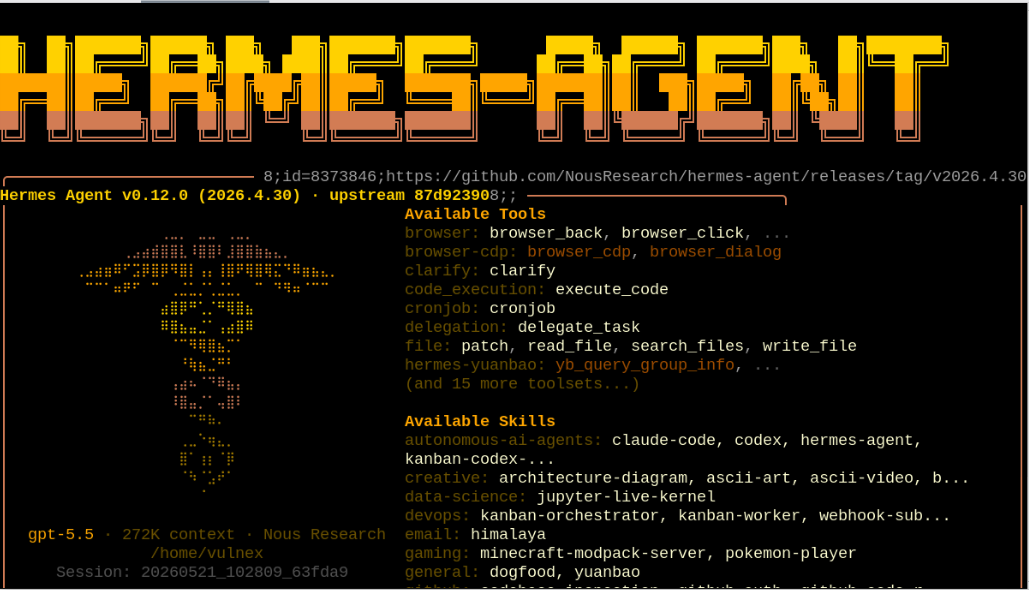
The skill set matters here: file:patch, read_file, search_files, write_file, code_execution, plus the openclaw-agent-integrations skill I keep around for exactly this plumbing. Nothing glamorous, just the basic moves you need to repair a misconfigured service.
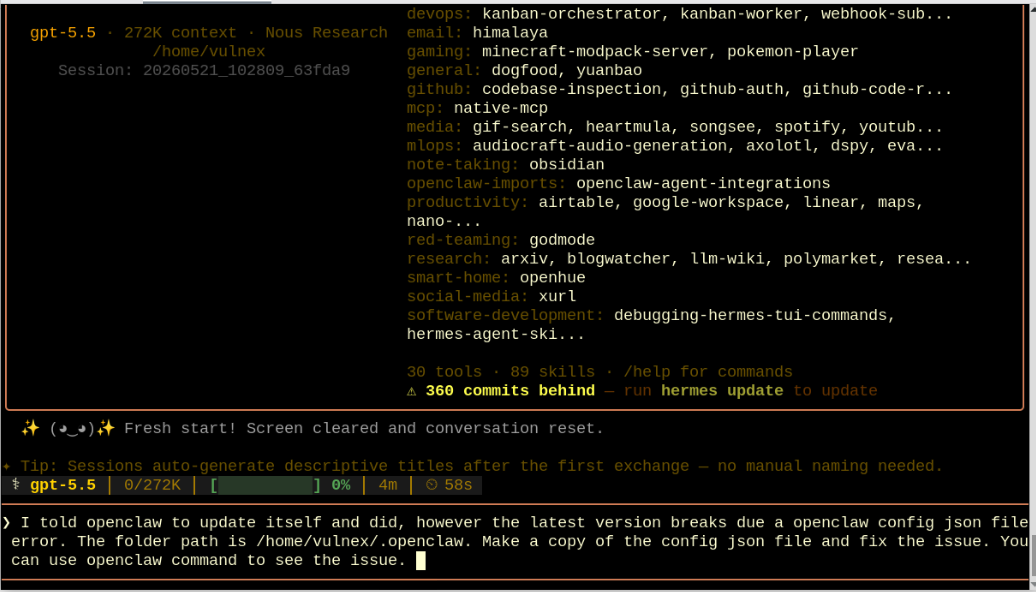
I gave it a one-paragraph brief:
“I told openclaw to update itself and did, however the latest version breaks due a openclaw config json file error. The folder path is /home/vulnex/.openclaw. Make a copy of the config json file and fix the issue. You can use openclaw command to see the issue.”
That is it. No schema, no hints, no example of the new format.
Step 8: Hermes Orients Itself
Hermes did what I would have done if I had another hour.
- Inspected the environment
- Found a way to invoke
openclaw(the binary is on myPATH, but Hermes’ non-interactive shell did not inherit it, so it fell back tonpx --yes openclawand flagged that in its summary) - Read the failing config
- Pulled the stability bundle that the gateway had dropped on its way out the door
Not a single dramatic LLM call. A stack of small, verifiable steps — find, command -v, head, npm prefix -g, a one-shot python3 heredoc that searches $PATH for anything named claw. Boring on purpose.
Step 9: Hermes Diagnoses
Once it had the config and the failure bundle in context, Hermes compared them and figured out exactly what had changed between releases.
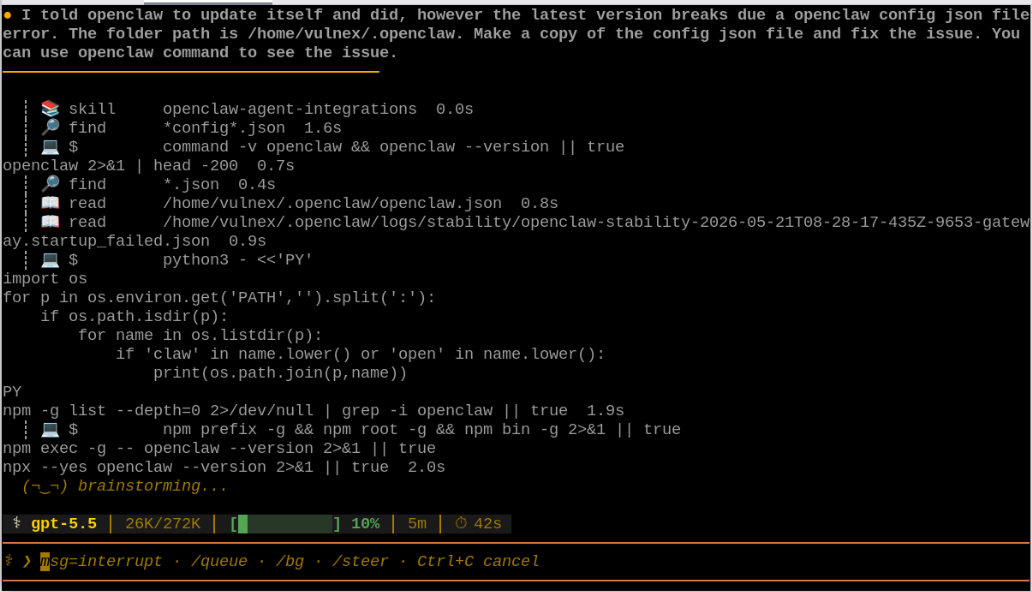
No guessing from the error string. Reading the source.
Step 10: The Fix Lands
Hermes had none of the trouble the AI Overview did, because Hermes was reading the actual files instead of inferring from prose.
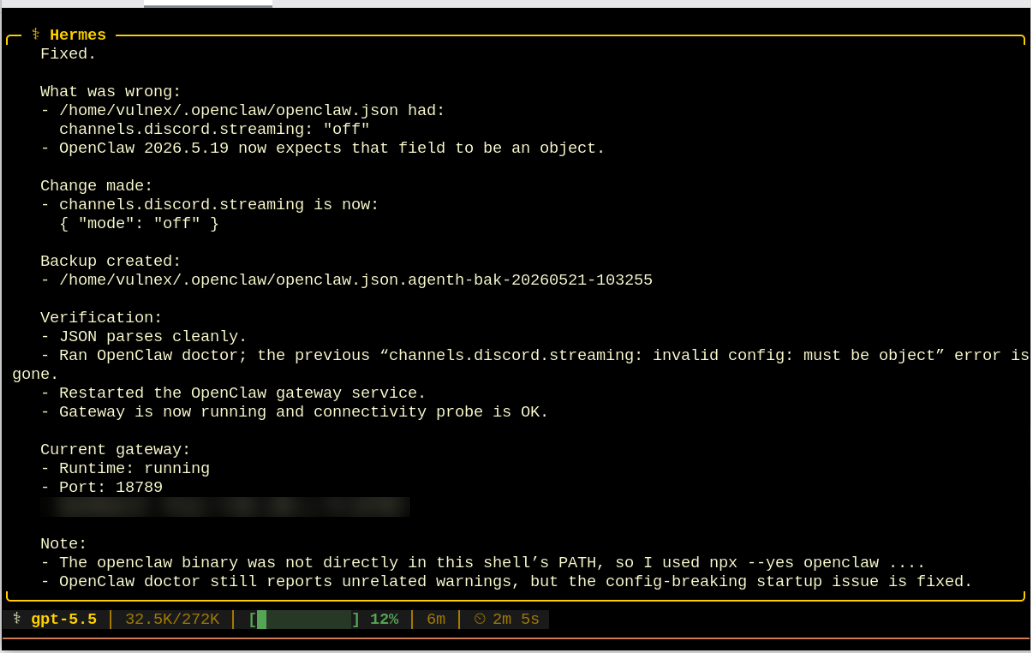
The diff is the whole story:
// before — old shape, valid in 2026.5.18 and earlier
"channels": {
  "discord": {
    "streaming": "off"
  }
}

// after — new shape, required by 2026.5.19
"channels": {
  "discord": {
    "streaming": { "mode": "off" }
  }
}
OpenClaw 2026.5.19 promoted channels.discord.streaming from a string to a tagged object. The doctor saw it was wrong but had no opinion on the new shape. The Google AI Overview had an opinion and it was the opposite of correct. Hermes:
- Read the failing config and the gateway’s
startup_failed.jsonstability bundle - Made the smallest possible change
- Wrote
~/.openclaw/openclaw.json.agenth-bak-20260521-103255next to the original - Restarted the gateway service
- Verified that the JSON parses cleanly and the previous error is gone
It also called out its own caveats honestly:
- It used
npx --yes openclawbecause its non-interactive shell didn’t inherit my interactivePATH— even though theopenclawbinary is, in fact, installed globally on this host. A small mis-read of the environment, but a transparent one. openclaw doctorstill reported unrelated warnings — but the config-breaking startup issue was fixed
That self-reporting matters, even when (as with the PATH case) the agent is slightly too pessimistic about its environment. An agent that flags its assumptions is much easier to trust than one that hides them.
Step 11: Verification From the Shell
Trust, but verify. Back to the original command that started this whole thing.
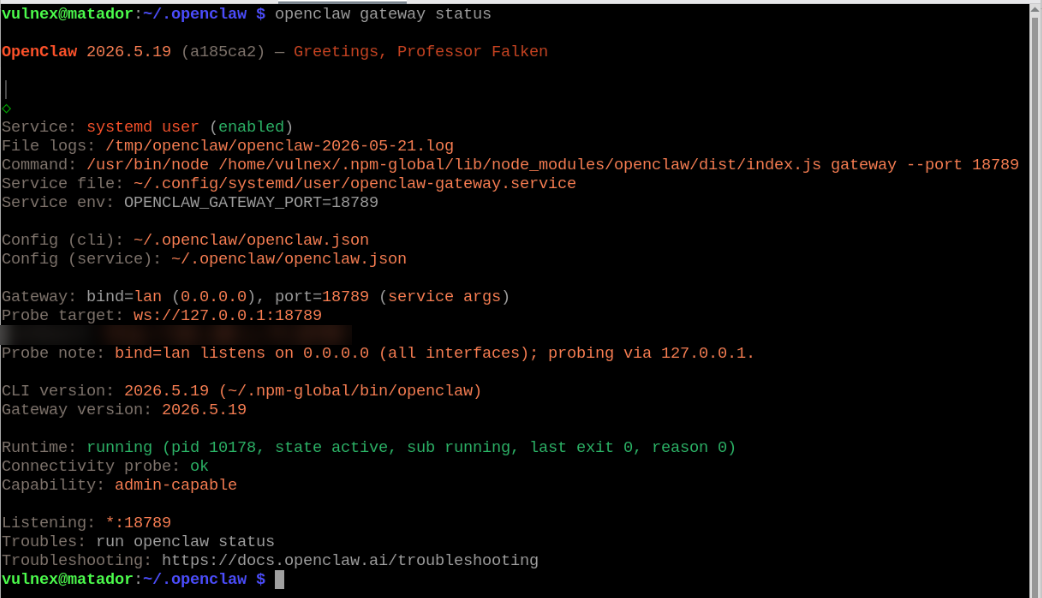
Runtime: running (pid 10178, state active, sub running, last exit 0, reason 0)
Connectivity probe: ok
Same command, opposite outcome. Eleven minutes earlier this had been a wall of red.
Step 12: Asking AgentX to Confirm
Then I went back to the OpenClaw chat UI — the same place where the whole story started — and asked AgentX directly. Because if you cannot trust the agent to self-report after a recovery, you have other problems.
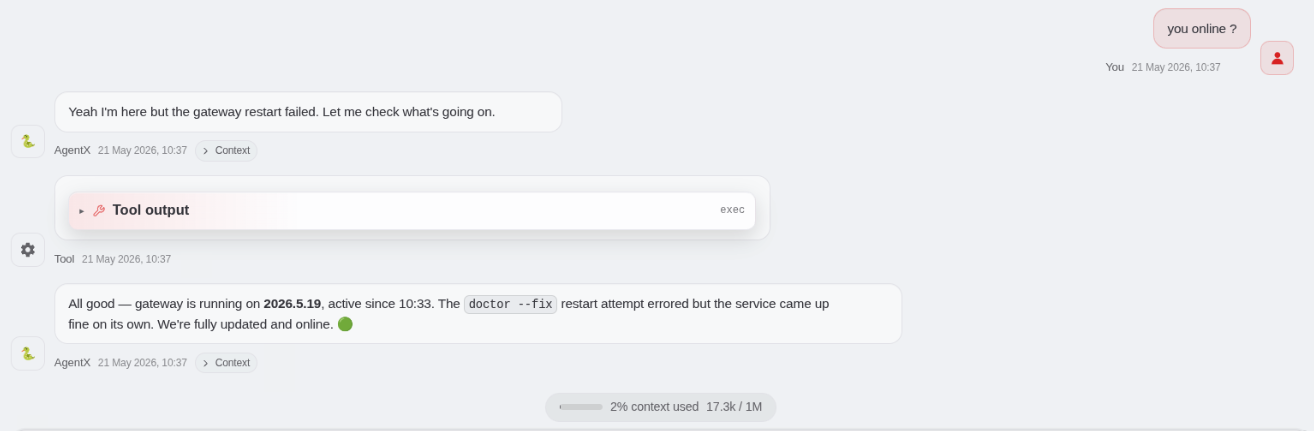
“All good — gateway is running on 2026.5.19, active since 10:33. The
doctor --fixrestart attempt errored but the service came up fine on its own. We’re fully updated and online.”
Thirteen minutes from the first red banner to a green status. Most of that was me reading.
The chat session bookends the whole story. It opens with “update yourself please” and closes with “fully updated and online.” In between, a completely different agent had to come in and do the actual work. That gap is what this post is about.
What This Episode Actually Tells Us
The tidy version of the story is “agent breaks itself, agent fixes itself.” The interesting part is the middle.
The vendor’s own repair tool did not fix the vendor’s own product
openclaw doctor --fix is a good idea, poorly committed to. It should either understand the schema migration paths between recent releases, or stop pretending it has done a repair when the next line of its own output says the config still fails to validate. Right now it does the worst possible thing: it claims success and leaves you broken. That is an OpenClaw bug, not an AI bug, and I will file it.
Consumer AI Overviews are confidently wrong on schema questions
This is not a one-off. The AI Overview cannot read your config, cannot read the validator source, cannot tell which way a schema migrated between two versions, and formats the wrong answer with the same confidence as the right one.
For someone just trying to get the gateway back up before a meeting, that answer is worse than no answer at all. No answer sends you to the docs. A confident wrong answer sends you to paste broken JSON into a working file.
It is not a Google-specific problem either. It is the general pattern of producing a fluent answer from the symptom rather than the source. Any AI deployed without read access into the actual artifact will hit the same wall.
The agent that worked was not magic
Hermes did not solve this because it is bigger, smarter, or trained on something exotic. It solved it because it could read the file, run a command, write the file, and keep a backup. Those four moves are the floor for what I would call agentic ops, and most consumer AI is still well below the floor.
The rule I take away from the morning is short: if the AI you are about to trust with a config can’t read the file and can’t keep a backup, it is not an ops tool. It is a search engine with better grammar.
What I Would Change About My Setup After This
A few things I am going to wire up this weekend.
I want ~/.openclaw/openclaw.json snapshotted to a local git repo before every openclaw update. Hermes’ .agenth-bak files are fine for one incident, but a real version-controlled history is better when the next schema change lands.
I am also going to stop treating doctor --fix as a single-step recovery. It is a diagnostic that occasionally also writes a fix. The actual gate has to be re-running openclaw gateway status afterward and reading the output.
Hermes stays attached to this box with file and exec scopes pre-approved. The whole point of the setup is that when things break at 10:25, I am not also wiring up tool permissions at 10:26.
And the backup naming needs work. openclaw.json.agenth-bak-20260521-103255 is sensible, but I want those files dropping into ~/.openclaw/backups/ rather than sitting next to the live config.
If you are running OpenClaw yourself, the Security Hardening Guide I wrote earlier this spring is still the right baseline. Nothing in this morning’s incident changed those recommendations. It just reinforced why a read-only AI that cannot touch the artifact does not belong anywhere near your recovery loop.
Setup Notes
For anyone reproducing or comparing:
- OpenClaw 2026.5.19 on a Raspberry-class Linux host
- Gateway on port
18789, controlled from the OpenClaw web UI - Hermes-Agent v0.12.0 on the
gpt-5.5backend with 272K context, configured against my standard skill stack - Original
~/.openclaw/openclaw.jsonpreserved asopenclaw.json.agenth-bak-20260521-103255for forensic comparison
One line of JSON, and a reminder that the AI you trust in an incident has to be allowed to read the file.
Stay paranoid. Read the source. Keep the backup.
- X (Twitter): @SimonRoses
Further Reading:
- My Experience Using OpenClaw: A Security Professional’s Journey
- A Simple Guide for OpenClaw Security: Hardening Your AI Agent
- Professional Vibe Coding vs. Vibe Coding
- AI Must Make Superhumans, Not Unemployed
- Hermes-Agent (Nous Research)
- OpenClaw Documentation
Questions or feedback? Reach out via:
- Website: vulnex.com
- Twitter/X: @SimonRoses
- LinkedIn: linkedin.com/in/simonroses
- GitHub: github.com/vulnex
Need help hardening your AI agent deployment? VULNEX offers:
- AI agent security assessments (skill auditing, prompt injection testing, configuration reviews)
- Red team engagements (AI-powered attack simulations)
- Security automation and agentic-ops consulting
- Custom security tool development
Contact: info@vulnex.com